
Print it, read it, share notes with other candidates anytime. The Linux Foundation Certified Kubernetes Security Specialist (CKS) PDF version at TestBraindump: 66 practice questions for the CKS exam.
Linux Foundation CKS Exam Overview:
| Certification Vendor: | Linux Foundation / CNCF |
|---|---|
| Exam Name: | Certified Kubernetes Security Specialist |
| Exam Number: | CKS |
| Exam Duration: | 120 minutes |
| Certificate Validity Period: | 2 years |
| Passing Score: | 67% |
| Related Certifications: | Certified Kubernetes Application Developer (CKAD) Certified Kubernetes Administrator (CKA) |
| Available Languages: | English, Simplified Chinese, Japanese |
| Exam Format: | Hands-on tasks, Command-line operations, Online proctored, Performance-based |
| Exam Price: | $445 USD |
| Real Exam Qty: | 15-20 tasks |
| Recommended Training: | LFS260: Kubernetes Security Essentials |
| Exam Registration: | Linux Foundation Training Portal |
| Sample Questions: |  |
| Exam Way: | Online, remotely proctored, live monitoring via webcam and screen sharing |
| Pre Condition: | Must hold valid, non-expired Certified Kubernetes Administrator (CKA) certification |
| Official Syllabus URL: | https://training.linuxfoundation.org/certification/certified-kubernetes-security-specialist/ |
Linux Foundation CKS Exam Syllabus Topics:
| Section | Weight | Objectives |
|---|---|---|
| Topic 1: Supply Chain Security | 20% | - Signed artifacts & verification - SBOM & CI/CD security - Image security & scanning - Permitted registries - Static analysis tools |
| Topic 2: Monitoring, Logging and Runtime Security | 20% | - Incident investigation - Threat detection (Falco) - Behavioral analytics - Audit log configuration - Container immutability |
| Topic 3: System Hardening | 10% | - Minimize OS attack surface - Network access control - Least privilege IAM - Kernel hardening (AppArmor, seccomp) |
| Topic 4: Minimize Microservice Vulnerabilities | 20% | - Pod Security Standards - Security contexts - Secret management - OPA/Gatekeeper implementation - Isolation & multi-tenancy |
| Topic 5: Cluster Setup | 15% | - Binary verification - Secure Ingress configuration - CIS benchmark compliance - Network security policies - Node metadata protection |
| Topic 6: Cluster Hardening | 15% | - API access restriction - RBAC configuration - Component updates & vulnerability mitigation - Service account security |
Linux Foundation CKS Exam: Partner Answers
Yes:
After any course, reinforce it with the 66 practice questions for the Linux Foundation Certified Kubernetes Security Specialist (CKS) — every answer expert-verified.
The Linux Foundation Certified Kubernetes Security Specialist (CKS) blueprint spans 6 domains — including Monitoring, Logging and Runtime Security (20%), System Hardening (10%), Cluster Setup (15%). Know your strength and shortcoming per domain; the complete outline above lists every subtopic.
120 minutes for 15-20 tasks questions. The TestBraindump test engine simulates the actual test's atmosphere, so you get used to real conditions in advance.
Yes — download the free trial of the Linux Foundation Certified Kubernetes Security Specialist (CKS) study materials before you buy and judge the profession and accuracy yourself. Purchases include 365 days of free updates, sent automatically and immediately by email; renew afterward at 50% off.
$445 USD per attempt, 67% to pass. A failed attempt is a loss of time and money — prepare steadily with the 66 practice questions for the CKS exam at TestBraindump.
Through the vendor's official registration channels:
The Linux Foundation Certified Kubernetes Security Specialist (CKS) is delivered Online, remotely proctored, live monitoring via webcam and screen sharing — pick the arrangement that suits you when booking.
The Linux Foundation Certified Kubernetes Security Specialist (CKS) is Linux Foundation's certification exam for Certified Kubernetes Security Specialist (CKS), at the Professional level. Passing it is a new start — toward better salary, decent work, and promotion chances. Related credentials include Certified Kubernetes Administrator (CKA), Certified Kubernetes Application Developer (CKAD).
Must hold valid, non-expired Certified Kubernetes Administrator (CKA) certification Eligibility rules change over time, so verify the current requirements on the official page (official CKS exam page) before registering.
Upon successful payment, our system emails the Linux Foundation Certified Kubernetes Security Specialist (CKS) test braindump automatically within about a minute — credit card payment accepted, with 24/7 help if nothing arrives within 2 hours. If you fail the corresponding CKS exam within 60 days of purchase, scan your exam transcripts and email them as attachments within 2 days of the exam — together with a scanned enrollment slip and the official Score Report PDF — and after confirmation we refund the full amount within 7 days. Excluded: exams within 3 days of purchase, candidate names that don't match the payer, and free or expired products. Or exchange for two equal-value products free.
Linux Foundation Certified Kubernetes Security Specialist (CKS) Sample Questions:
SIMULATION
Create a network policy named allow-np, that allows pod in the namespace staging to connect to port 80 of other pods in the same namespace.
Ensure that Network Policy:-
1. Does not allow access to pod not listening on port 80.
2. Does not allow access from Pods, not in namespace staging.
Correct Answer:
See the Explanation belowExplanation:
apiVersion: networking.k8s.io/v1
kind: NetworkPolicy
metadata:
name: network-policy
spec:
podSelector: {} #selects all the pods in the namespace deployed
policyTypes:
- Ingress
ingress:
- ports: #in input traffic allowed only through 80 port only
- protocol: TCP
port: 80
SIMULATION
Enable audit logs in the cluster, To Do so, enable the log backend, and ensure that
1. logs are stored at /var/log/kubernetes-logs.txt.
2. Log files are retained for 12 days.
3. at maximum, a number of 8 old audit logs files are retained.
4. set the maximum size before getting rotated to 200MB
Edit and extend the basic policy to log:
1. namespaces changes at RequestResponse
2. Log the request body of secrets changes in the namespace kube-system.
3. Log all other resources in core and extensions at the Request level.
4. Log "pods/portforward", "services/proxy" at Metadata level.
5. Omit the Stage RequestReceived All other requests at the Metadata level
Correct Answer:
Kubernetes auditing provides a security-relevant chronological set of records about a cluster. Kube-apiserver performs auditing. Each request on each stage of its execution generates an event, which is then pre-processed according to a certain policy and written to a backend. The policy determines what's recorded and the backends persist the records.
You might want to configure the audit log as part of compliance with the CIS (Center for Internet Security) Kubernetes Benchmark controls.
The audit log can be enabled by default using the following configuration in cluster.yml:
services:
kube-api:
audit_log:
enabled: true
When the audit log is enabled, you should be able to see the default values at /etc/kubernetes/audit-policy.yaml The log backend writes audit events to a file in JSONlines format. You can configure the log audit backend using the following kube-apiserver flags:
--audit-log-path specifies the log file path that log backend uses to write audit events. Not specifying this flag disables log backend. - means standard out
--audit-log-maxage defined the maximum number of days to retain old audit log files
--audit-log-maxbackup defines the maximum number of audit log files to retain
--audit-log-maxsize defines the maximum size in megabytes of the audit log file before it gets rotated If your cluster's control plane runs the kube-apiserver as a Pod, remember to mount the hostPath to the location of the policy file and log file, so that audit records are persisted. For example:
--audit-policy-file=/etc/kubernetes/audit-policy.yaml \
--audit-log-path=/var/log/audit.log
SIMULATION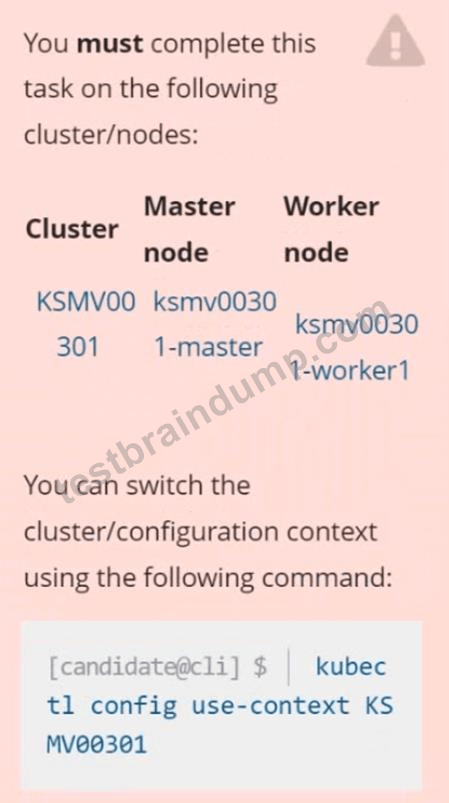
Context
This cluster uses containerd as CRI runtime.
Containerd's default runtime handler is runc. Containerd has been prepared to support an additional runtime handler, runsc (gVisor).
Task
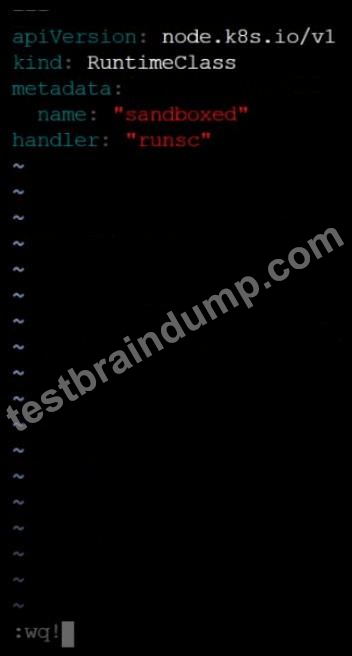
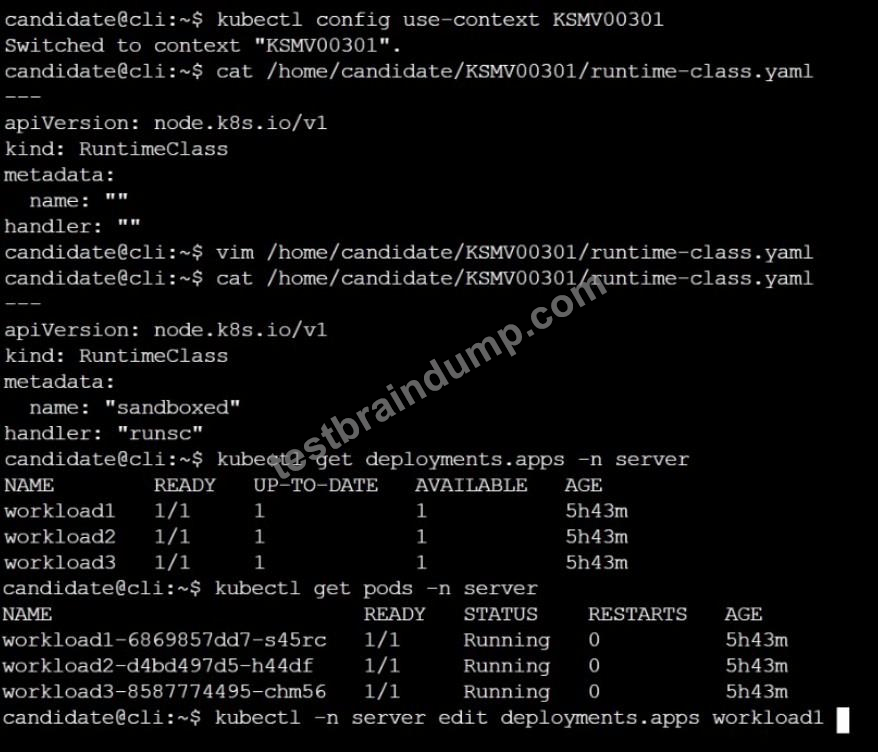
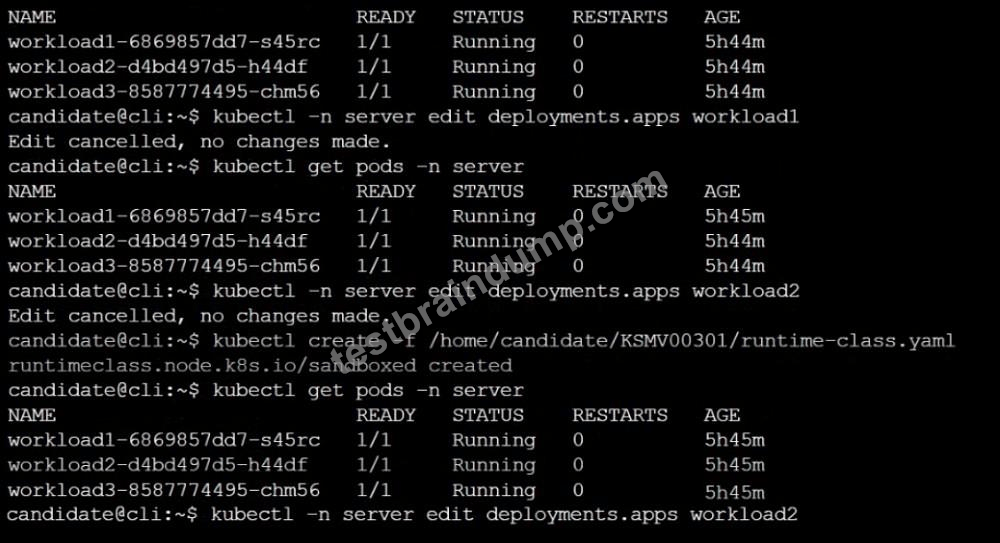
Create a RuntimeClass named sandboxed using the prepared runtime handler named runsc.
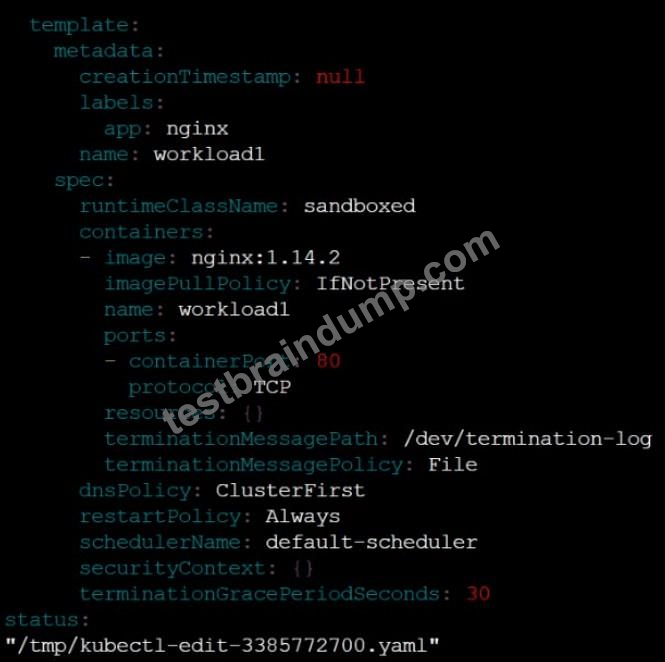
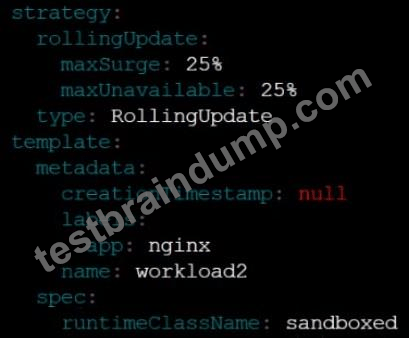
Update all Pods in the namespace server to run on gVisor.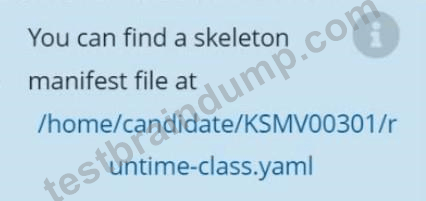
Correct Answer:
See the Explanation below
Explanation: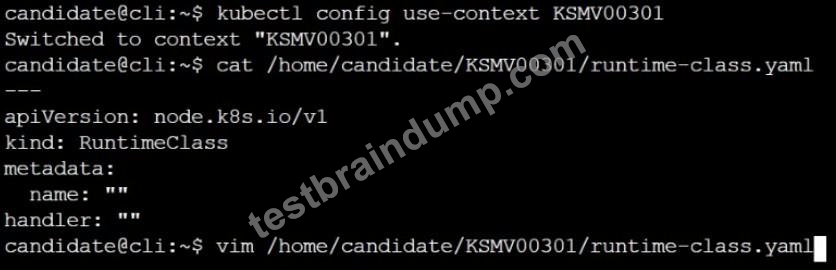
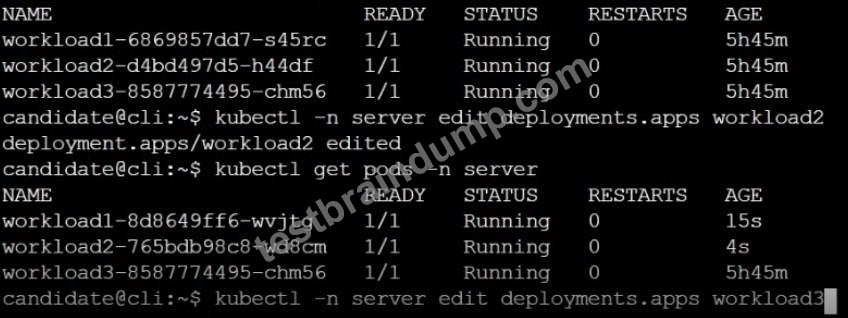
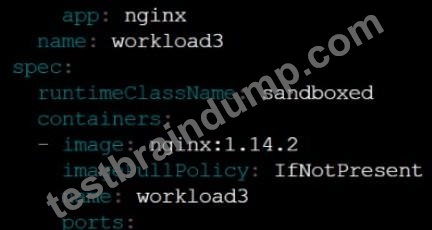
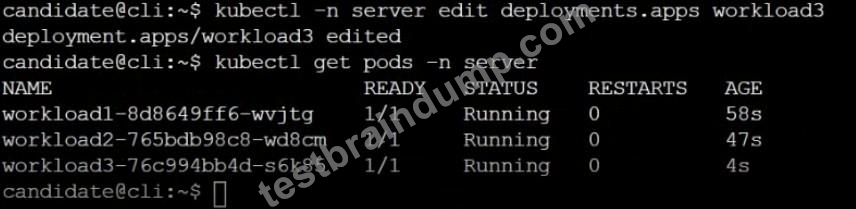
SIMULATION
Create a RuntimeClass named gvisor-rc using the prepared runtime handler named runsc.
Create a Pods of image Nginx in the Namespace server to run on the gVisor runtime class
Correct Answer:
SeetheExplanationbelowExplanation:
Install the Runtime Class for gVisor
{ # Step 1: Install a RuntimeClass
cat <<EOF | kubectl apply -f -
apiVersion: node.k8s.io/v1beta1
kind: RuntimeClass
metadata:
name: gvisor
handler: runsc
EOF
}
Create a Pod with the gVisor Runtime Class
{ # Step 2: Create a pod
cat <<EOF | kubectl apply -f -
apiVersion: v1
kind: Pod
metadata:
name: nginx-gvisor
spec:
runtimeClassName: gvisor
containers:
- name: nginx
image: nginx
EOF
}
Verify that the Pod is running
{ # Step 3: Get the pod
kubectl get pod nginx-gvisor -o wide
}
SIMULATION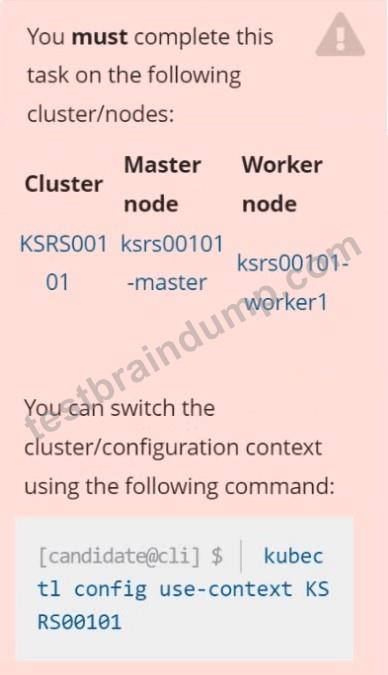
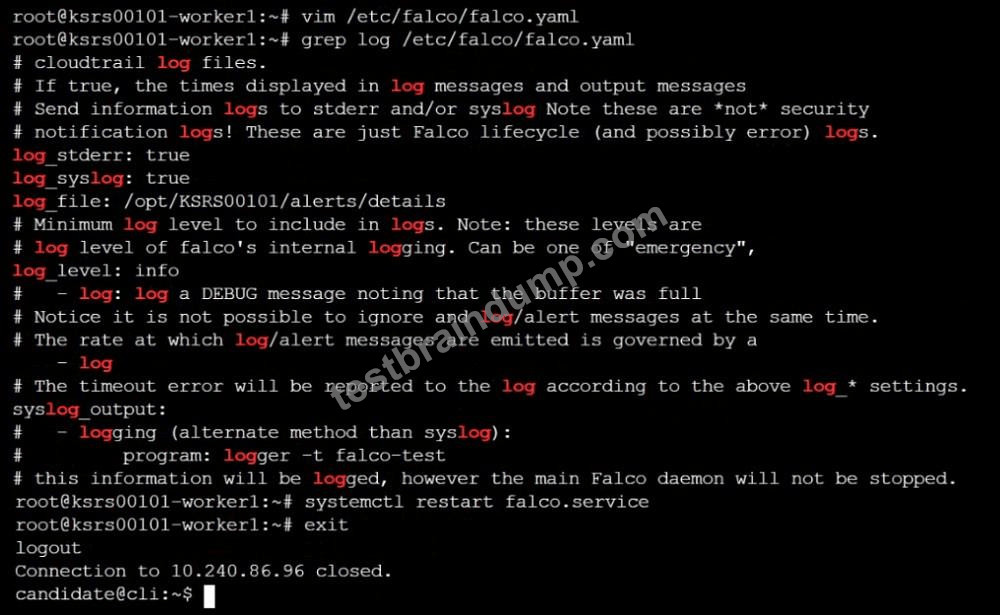
Two tools are pre-installed on the cluster's worker node:
Using the tool of your choice (including any non pre-installed tool), analyze the container's behavior for at least 30 seconds, using filters that detect newly spawning and executing processes.
Store an incident file at /opt/KSRS00101/alerts/details, containing the detected incidents, one per line, in the following format: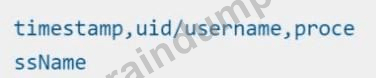
The following example shows a properly formatted incident file: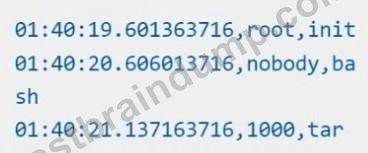

Correct Answer:
See explanation below
Explanation: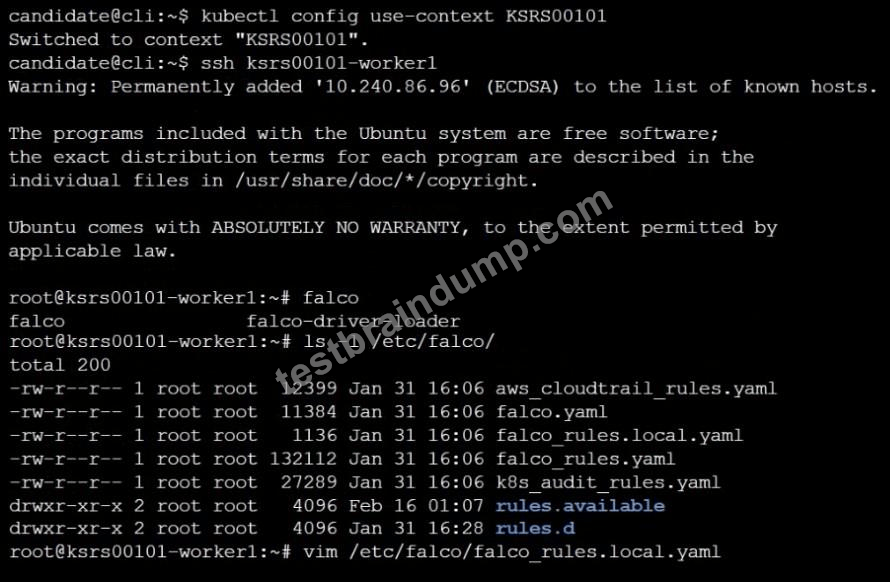
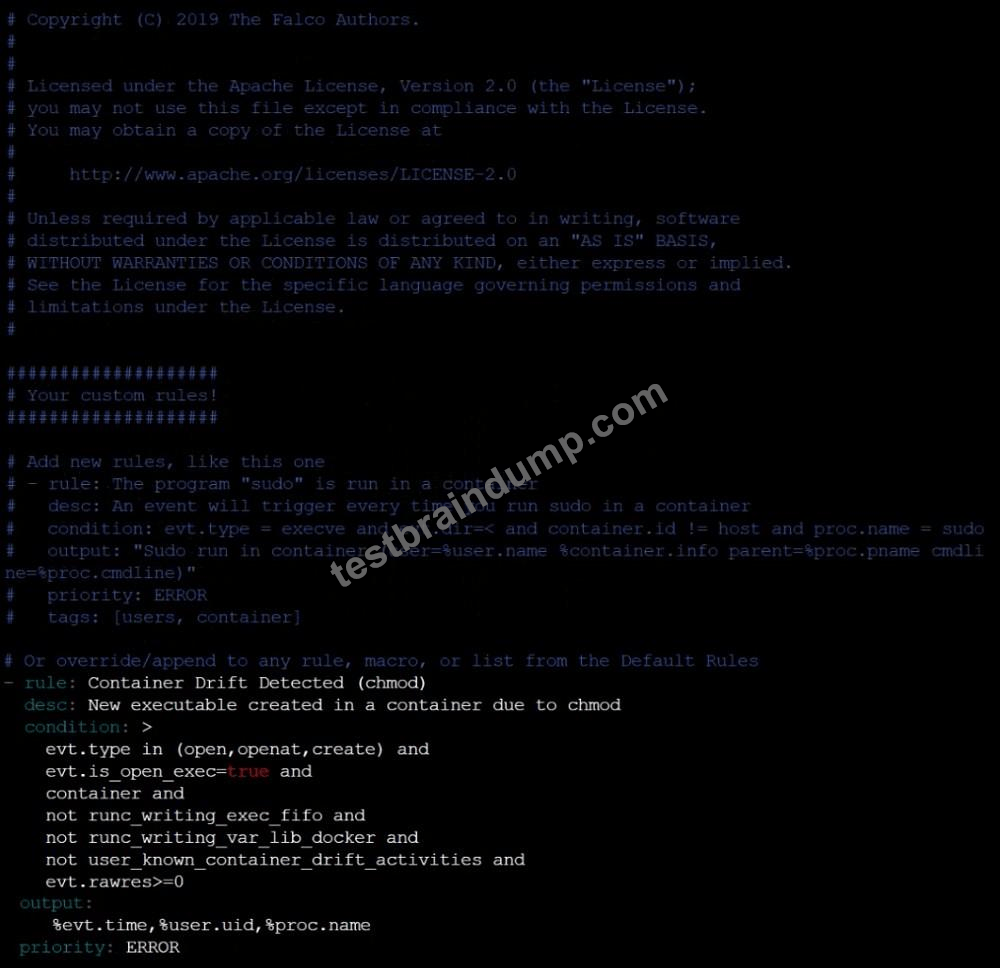
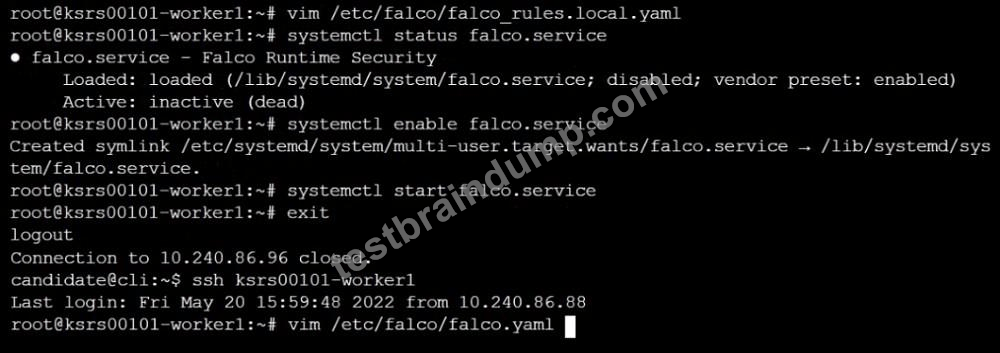
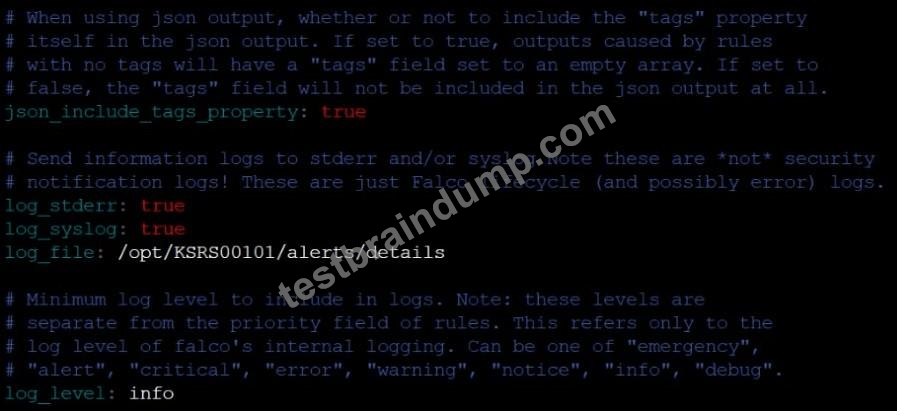
 Randolph
 Virgil
  Benson
 Giles
Giles  Leonard
  Paula
Paula 
 Flora
Flora  Jennifer
  Herman
  Pandora
  Jim
Jim  Harlan
  Leif
Leif  Anastasia
  Marlon
  Irene
Irene  Otto
Otto  Merry
Merry  Margaret
  Tyrone
  Sherry








