
Give You Free Regular Updates on FCP_FGT_AD-7.6 Exam Questions Aug 22, 2026
Achieve the FCP_FGT_AD-7.6 Exam Best Results with Help from Fortinet Certified Experts
NEW QUESTION # 62
Refer to the exhibit.
An administrator has created a new firewall address to use as the destination for a static route.
Why is the administrator not able to select the new address in the Destination field of the new static route?
- A. In the new firewall address, the FQDN address must first beresolved.
- B. In the new static route, the administrator must select Named Address.
- C. In the new firewall address, Routing configuration must be enabled.
- D. In the new static route, the administrator must first set the interface to port2.
Answer: C
Explanation:
To use an FQDN-based address object as a destination in a static route, the "Routing configuration" option must be enabled in the firewall address settings. Without this, the address cannot be selected for routing.
NEW QUESTION # 63
Refer to the exhibits. An administrator configured the Web Filter Profile to block access to all social networking sites except Facebook. However, when users try to access Facebook.com, they are redirected to a FortiGuard web filtering block page.
Based on the exhibits, which configuration change must the administrator make to allow Facebook while blocking all other social networking sites?

- A. Set the Action as Exempt for www.facebook.com in the Static URL Filter.
- B. Change the Feature set of Web Filter Profile as Proxy-based.
- C. Change the type as Simple in the Static URL Filter section.
- D. Set the Social Networking action as warning in the FortiGuard Category Based Filter.
Answer: A
Explanation:
The FortiGuard category filter is blocking Social Networking, which includes Facebook. Although a static URL filter entry for www.facebook.com exists, its action is set to Monitor, so it does not override the category block. To allow Facebook while blocking other social networking sites, the action for www.facebook.com in the Static URL Filter must be set to Exempt. This explicitly bypasses category filtering for that URL.
NEW QUESTION # 64
What are two characteristics of HA cluster heartbeat IP addresses in a FortiGate device?
(Choose two.)
- A. Heartbeat interfaces have virtual IP addresses that are manually assigned.
- B. A change in the heartbeat IP address happens when a FortiGate device joins or leaves the cluster.
- C. The heartbeat interface of the primary device in the cluster is always assigned IP address
169.254.0.1. - D. Heartbeat IP addresses are used to distinguish between cluster members.
Answer: B,D
Explanation:
The FGCP uses link-local IPv4 addresses (see RFC 3927) in the 169.254.0.x range for the virtual HA heartbeat interface (port_ha) and for the inter-VDOM link interfaces between the vsys_ha and management VDOM. When members join an HA cluster, each member's heartbeat interface (port_ha) is assigned an IP address from the range of 169.254.0.1 to 169.254.0.63/26. HA inter- VDOM link interfaces (havdlink0 and havdlink1) are assigned IP address from the range of
169.254.0.65 to 169.254.0.66/26.
The IP address that is assigned to a virtual heartbeat interface depends on the serial number priority of the member. Higher serial numbers have a higher priority, and therefore a lower serialno_prio number.
NEW QUESTION # 65
What are two features of collector agent advanced mode? (Choose two.)
- A. Advanced mode supports nested or inherited groups.
- B. Advanced mode uses the Windows convention -NetBios: Domain\Username.
- C. In advanced mode, FortiGate can be configured as an LDAP client and group filters can be configured on FortiGate.
- D. In advanced mode, security profiles can be applied only to user groups, not individual users.
Answer: A,C
Explanation:
Also, advanced mode supports nested or inherited groups; that is, users can be members of subgroups that belong to monitored parent groups.
In advanced mode, you can configure FortiGate as an LDAP client and configure the group filters on FortiGate. You can also configure group filters on the collector agent.
NEW QUESTION # 66
When configuring a FortiGate in a multi-WAN setup, why would an administrator enable session preservation on an interface?
- A. To make sure all sessions without source NAT enabled always use the primary WAN link
- B. To improve security by forcing users to authenticate again when the WAN link changes
- C. To ensure that existing SSL VPN connections remain on the same interface even if route changes occur
- D. To allow the FortiGate to dynamically change interfaces for all active sessions when a WAN link fails
Answer: C
Explanation:
Session preservation keeps active sessions, such as SSL VPNs, tied to the original interface to prevent disruption when WAN routes change.
NEW QUESTION # 67
Refer to the exhibits.


An administrator creates a new address object on the root FortiGate (Local-FortiGate) in the security fabric. After synchronization, this object is not available on the downstream FortiGate (ISFW).
What must the administrator do to synchronize the address object?
- A. Change the csfsetting on both devices to set downstream-access enable.
- B. Change the csfsetting on Local-FortiGate (root) to set fabric object-unification default.
- C. Change the csfsetting on ISFW (downstream) to set configuration-sync local.
- D. Change the csfsetting on ISFW (downstream) to set authorization-request-type certificate.
Answer: B
Explanation:
The CLI command fabric-object-unification is available only on the root FortiGate device. When set to local, global objects are not synchronized to downstream devices in the Security Fabric.
The default value is default.
NEW QUESTION # 68
You are encountering connectivity problems caused by intermediate devices blocking IPsec traffic.
In which two ways can you effectively resolve the problem? (Choose two.)
- A. You can turn on fragmentation to fix large certificate negotiation problems.
- B. You can configure a hub-and-spoke topology with SSL VPN tunnels to bypass blocked UDP ports.
- C. You should use the protocol IKEv2.
- D. You can use SSL VPN tunnel mode to prevent problems with blocked ESP and UDP ports (500 or 4500).
Answer: B,D
Explanation:
The training is basically trying to point out the advantage of FortiGate's SSL VPN over IPSec VPN in situation where issues are caused by an intermediate device.
IPsec uses ESP and UDP 500 and 4500, so where these are blocked, SSL VPN tunnel mode shines because it uses HTTPS (443) and TLS by default (both TCP).
Again where UDP ports are blocked, SSL VPN shines (Tunnel mode Hub and Spoke) because it does not use UDP.
NEW QUESTION # 69
Refer to the exhibits. The exhibits show a diagram of a FortiGate device connected to the network, and the firewall policies, VIP, and IP pool configurations on the FortiGate device.
The WAN (port2) interface has the IP address 100.65.0.101/24.
The LAN (port4) interface has the IP address 10.0.11.254/24.
The first firewall policy has NAT enabled using the IP pool. The second firewall policy is configured with a VIP as the destination address.
Which IP address will be used to source NAT (SNAT) the internet traffic coming from a workstation with the IP address 10.0.11.50?


- A. 100.65.0.101
- B. 10.0.11.254
- C. 100.65.0.200
- D. 100.65.0.102
Answer: D
Explanation:
Traffic from the workstation 10.0.11.50 going to the internet matches the Internet(1) policy (LAN
→ WAN) which has NAT enabled and is configured to use the IP Pool. The IP pool specifies the external address 100.65.0.102.
FortiGate will perform source NAT (SNAT) on the outbound traffic, translating the source IP of the workstation to 100.65.0.102.
NEW QUESTION # 70
Refer to the exhibits.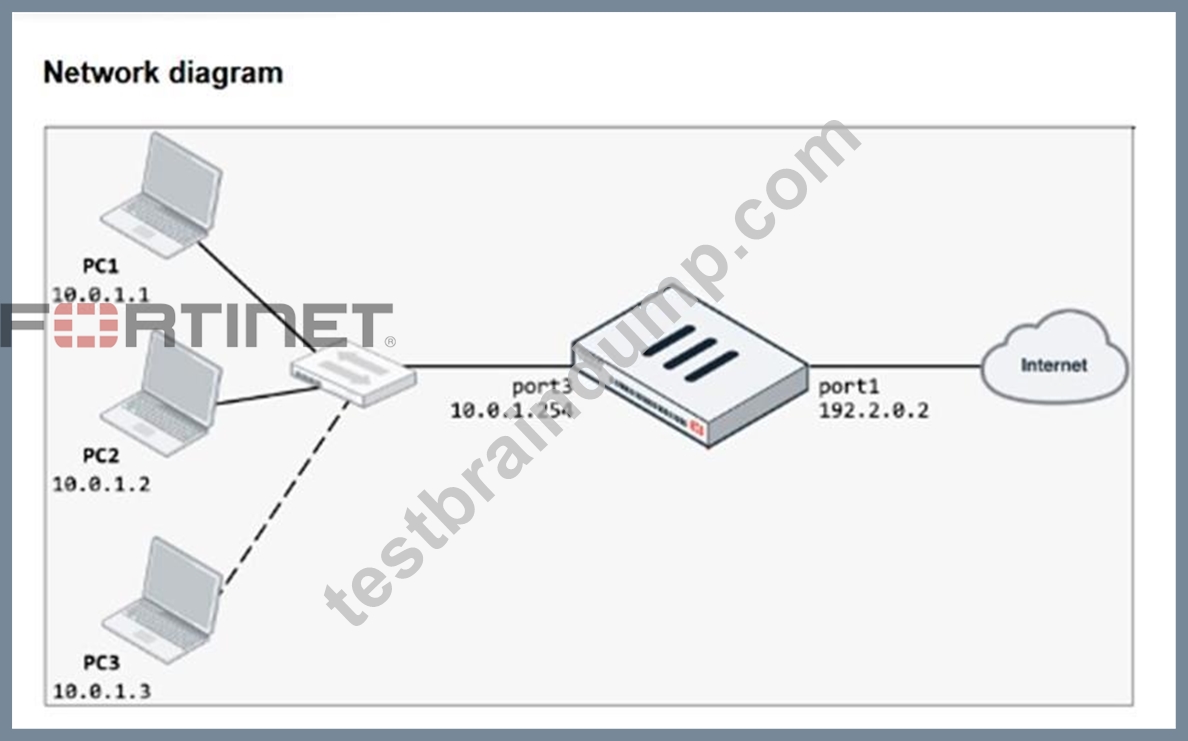


The exhibits show a diagram of a FortiGate device connected to the network, as well as the firewall policy and IP pool configuration on the FortiGate device.
Two PCs, PC1 and PC2, are connected behind FortiGate and can access the internet successfully. However, when the administrator adds a third PC to the network (PC3), the PC cannot connect to the internet.
Based on the information shown in the exhibit, which two configuration options can the administrator use to fix the connectivity issue for PC3? (Choose two.)
- A. In the firewall policy configuration, add 10.0.1.3as an address object in the source field.
- B. Configure another firewall policy that matches only the address of PC3 as source, and then place the policy on top of the list.
- C. In the IP pool configuration, set endipto 192.2.0.12.
- D. In the IP pool configuration, set typeto overload.
Answer: C,D
Explanation:
With IP pool type set to One-to-One, only as many internal hosts as there are public IPs in the pool (192.2.0.10-192.2.0.11) can use NAT. Changing the type to overload allows all internal hosts (including PC3) to share the available public IPs, so PC3 can reach the internet.
Alternatively, keeping One-to-One but extending the pool to 192.2.0.10-192.2.0.12 adds another public IP, allowing a third internal host (PC3) to be mapped and gain internet access.
NEW QUESTION # 71
Refer to the exhibit, which shows a routing table.
An administrator wants to create a new static route so the traffic to the subnet 172.20.1.0/24 is routed through port2 only.
What are the two criteria that the administrator can use to achieve this objective? (Choose two.)
- A. The existing static route through port3 must have the distance set to 11.
- B. The new static route must have the distance set to 9.
- C. The new static route must have the priority set to 3.
- D. The new static route must have the metric set to 1.
Answer: A,B
NEW QUESTION # 72
An administrator has configured the following settings:
What are the two results of this configuration? (Choose two.)
- A. The number of logs generated by denied traffic is reduced.
- B. A session for denied traffic is created.
- C. Session helpers are disabled for denied traffic.
- D. Denied users are blocked for 30 minutes.
Answer: A,B
Explanation:
set ses-denied-traffic enable → ensures FortiGate creates a session entry even for denied traffic.
set block-session-timer 30 → sets the duration (30 seconds) that denied sessions remain in the session table. This prevents repeated logging for every packet in the same denied flow, thereby reducing the number of logs generated.
NEW QUESTION # 73
Refer to the exhibit.
The exhibit shows the FortiGuard Category Based Filter section of a corporate web filter profile.
An administrator must block access to download.com, which belongs to the Freeware and Software Downloads category. The administrator must also allow other websites in the same category.
What are two solutions for satisfying the requirement? (Choose two.)
- A. Configure a separate firewall policy with action Deny and an FQDN address object for*.download.com as destination address.
- B. Configure a static URL filter entry for download.com with Type and Action set to Wildcard and Block, respectively.
- C. Set the Freeware and Software Downloads category Action to Warning.
- D. Configure a web override rating for download.com and select Malicious Websites as the subcategory.
Answer: B,D
NEW QUESTION # 74
FortiGate is integrated with FortiAnalyzer and FortiManager.
When creating a firewall policy, which attribute must an administrator include to enhance functionality and enable log recording on FortiAnalyzer and FortiManager?
- A. Sequence ID
- B. Policy ID
- C. Log ID
- D. Universally Unique Identifier
Answer: D
Explanation:
FortiGate uses a Universally Unique Identifier (UUID) for each firewall policy. This UUID is synchronized with FortiAnalyzer and FortiManager, allowing them to reliably identify the policy even if the policy ID or sequence changes. This ensures consistent log recording and enhanced functionality across integrated devices.
NEW QUESTION # 75
An administrator wanted to configure an IPS sensor to block traffic that triggers a signature set number of times during a specific time period.
How can the administrator achieve the objective?
- A. Use IPS packet logging option with periodical filter option.
- B. Use IPS filter, rate-mode periodical option.
- C. Use IPS filter, rate-mode periodical option.
- D. Use IPS group signatures, set rate-mode 60.
Answer: C
Explanation:
The IPS filter with the rate-mode set to "periodical" allows the administrator to block traffic that triggers a signature a specified number of times within a defined time period, meeting the requirement.
NEW QUESTION # 76
Refer to the exhibit. As an administrator you have created an IPS profile, but it is not performing as expected. While testing you got the output as shown in the exhibit.
What could be the possible reason of the diagnose output shown in the exhibit?
- A. FortiGate entered into IPS fail open state.
- B. There is a no firewall policy configured with an IPS security profile.
- C. Administrator entered the command diagnose test application ipsmonitor 99.
- D. Administrator entered the command diagnose test application ipsmonitor 5.
Answer: B
Explanation:
The output shows the IPS engine count as 0, indicating no active IPS engines are running. This typically means no firewall policy is referencing the IPS security profile, so the IPS profile is not being applied or triggered.
NEW QUESTION # 77
Refer to the exhibit.
Which statement about this firewall policy list is true?
- A. The firewall policies are listed by ID sequence view.
- B. LAN to WAN, WAN to LAN, and Implicit are sequence grouping view lists.
- C. The firewall policies are listed by ingress and egress interfaces pairing view.
- D. The Implicit group can include more than one deny firewall policy.
Answer: B
Explanation:
The firewall policy list shown is displayed in the sequence grouping view, where policies are grouped based on their traffic direction - such as LAN to WAN, WAN to LAN, and Implicit. This view helps administrators quickly identify and manage policies according to their interface pairings and logical traffic flow, rather than by numerical ID order.
NEW QUESTION # 78
Refer to the exhibit showing a FortiGuard connection debug output.
Based on the output, which two facts does the administrator know about the FortiGuard connection? (Choose two.)
- A. A local FortiManager is one of the servers FortiGate communicates with.
- B. One server was contacted to retrieve the contract information.
- C. There is at least one server that lost packets consecutively.
- D. FortiGate is using default FortiGuard communication settings.
Answer: B,D
Explanation:
The output shows that one server was contacted to retrieve FortiGuard contract information, as indicated under "Service : Web-filter" with "License : Contract" and "Num. of servers : 1." The entry "Default servers : Included" confirms that FortiGate is using the default FortiGuard communication settings, meaning it communicates directly with Fortinet's public FortiGuard servers instead of a custom or local override.
NEW QUESTION # 79
FortiGate is integrated with FortiAnalyzer and FortiManager.
When creating a firewall policy, which attribute must an administrator include to enhance functionality and enable log recording on FortiAnalyzer and FortiManager?
- A. Sequence ID
- B. Policy ID
- C. Log ID
- D. Universally Unique Identifier
Answer: D
NEW QUESTION # 80
Refer to the exhibits. An administrator creates a new address object on the root FortiGate (HQ- NGFW-1) in the Security Fabric. After synchronization, this object is not available on the downstream FortiGate (HQ-ISFW).
What must the administrator do to synchronize the address object?


- A. Change the csfsetting on both devices to set downstream-access enable.
- B. Change the csfsetting on HQ-NGFW-1 (root) to set fabric-object-unification default.
- C. Change the csfsetting on HQ-ISFW (downstream) to set configuration-sync local.
- D. Change the csfsetting on HQ-ISFW (downstream) to set saml-configuration-sync default.
Answer: B
Explanation:
On HQ-NGFW-1 (the root FortiGate), the setting set fabric-object-unification local prevents address objects created on the root from synchronizing downstream. To propagate objects across the Security Fabric, this must be set to default. Changing the root's csf configuration to set fabric-object-unification default ensures that new address objects are synchronized to HQ-ISFW and other downstream devices.
NEW QUESTION # 81
Which three pieces of information does FortiGate use to identify the hostname of the SSL server when SSL certificate inspection is enabled? (Choose three.)
- A. The subject field in the server certificate.
- B. The server name indication (SNI) extension in the client hello message.
- C. The host field in the HTTP header.
- D. The subject alternative name (SAN) field in the server certificate.
- E. The serial number in the server certificate.
Answer: A,B,D
Explanation:
When SSL certificate inspection is enabled on a FortiGate device, the system uses the following three pieces of information to identify the hostname of the SSL server:
* Server Name Indication (SNI) extension in the client hello message (B): The SNI is an extension in the client hello message of the SSL/TLS protocol. It indicates the hostname the client is attempting to connect to. This allows FortiGate to identify the server's hostname during the SSL handshake.
* Subject Alternative Name (SAN) field in the server certificate (C): The SAN field in the server certificate lists additional hostnames or IP addresses that the certificate is valid for. FortiGate inspects this field to confirm the identity of the server.
* Subject field in the server certificate (D): The Subject field contains the primary hostname or domain name for which the certificate was issued. FortiGate uses this information to match and validate the server's identity during SSL certificate inspection.
The other options are not used in SSL certificate inspection for hostname identification:
* Host field in the HTTP header (A): This is part of the HTTP request, not the SSL handshake, and is not used for SSL certificate inspection.
* Serial number in the server certificate (E): The serial number is used for certificate management and revocation, not for hostname identification.
References
* FortiOS 7.4.1 Administration Guide - SSL/SSH Inspection, page 1802.
* FortiOS 7.4.1 Administration Guide - Configuring SSL/SSH Inspection Profile, page 1799.
NEW QUESTION # 82
You have configured an application control profile, set peer-to-peer traffic to Block under the Categories tab, and applied it to the firewall policy. However, your peer-to-peer traffic on known ports is passing through the FortiGate without being blocked. What FortiGate settings should you check to resolve this issue?
- A. FortiGuard category ratings
- B. Application and Filter Overrides
- C. Network Protocol Enforcement
- D. Replacement Messages for UDP-based Applications
Answer: C
Explanation:
Network Protocol Enforcement settings control how FortiGate inspects and enforces protocols on traffic, including peer-to-peer applications on known ports. If not properly enabled, peer-to-peer traffic may bypass blocking despite the application control profile.
NEW QUESTION # 83
......
Detailed New FCP_FGT_AD-7.6 Exam Questions for Concept Clearance: https://www.testbraindump.com/FCP_FGT_AD-7.6-exam-prep.html
Provide FCP_FGT_AD-7.6 Practice Test Engine for Preparation: https://drive.google.com/open?id=1fCmC1royUk84nvtZ578KlYPjKrF54xuk
