
100% Free Microsoft Azure Administrator Associate AZ-104 Dumps PDF Demo Cert Guide Cover
PDF Exam Material 2021 Realistic AZ-104 Dumps Questions
Knowing the Exam Profile
Microsoft AZ-104 follows the same pattern as all Microsoft’s intermediate-level exams. Therefore, it contains nearly 40-60 questions and the total time duration given to answer them is 180 minutes. While the general passing score of about 70%, a certain number is not disclosed, and it is likely to get changed as per the total number of questions. The tasks are provided in the multiple-choice format but be ready to face the items of other types as well.
The results that you will gain come with lifetime validity. However, the vendor proposes various enhancement options for those who want to pump up their career. Interested candidates can choose to earn the higher-level accreditation of their liking. Also, other than bringing you the Azure Administrator Associate certificate, the exam score will lead to earning some ACE college credits.
When it comes to the cost, candidates will have to pay $165 as an exam fee. One must comprehend the amount is subject to change as per different countries. AZ-104 test can be taken in English, Simplified Chinese, Korean, and Japanese from anywhere in the world via a testing center and online proctored facility.
NEW QUESTION 182
You create the following resources in an Azure subscription:
* An Azure Container Registry instance named Registry1.
* An Azure Kubernetes Service (AKS) cluster named Cluster1.
You create a container image named App1 on your administrative workstation. You need to deploy App1 to Cluster1. What should you do first?
- A. Run the docker build command.
- B. Create a host pool on Cluster1.
- C. Run the az acr build command.
- D. Run the docker push command.
Answer: C
Explanation:
Run the az acr build command : Correct Choice
az acr build command queues a quick build, providing streaming logs for an Azure Container Registry
az acr build --registry
[--agent-pool]
[--auth-mode {Default, None}]
[--build-arg]
[--file]
[--image]
[--no-format]
[--no-logs]
[--no-push]
[--no-wait]
[--platform]
[--resource-group]
[--secret-build-arg]
[--subscription]
[--target]
[--timeout]
[<SOURCE_LOCATION>]
Create a host pool on Cluster1 : Incorrect Choice
Host pools are a collection of one or more identical virtual machines (VMs) within Windows Virtual Desktop environments. It won't deploy the app to the cluster.
Run the docker push command : Incorrect Choice
Use docker push to share your images to the Docker Hub registry or to a self-hosted one. It won't deploy the app to the cluster.
Run the docker build command : Incorrect Choice
This command will build an image from a Dockerfile. But in the question it has been said that image file is already built and need to deploy. This command will not deploy the image.
Reference:
https://docs.microsoft.com/en-us/cli/azure/acr?view=azure-cli-latest#az-acr-build
https://docs.docker.com/engine/reference/commandline/push/
https://docs.microsoft.com/en-us/azure/virtual-desktop/create-host-pools-azure-marketplace
https://docs.docker.com/engine/reference/commandline/build/
NEW QUESTION 183
You have an Azure web app named App1 that has two deployment slots named Production and Staging. Each slot has the unique settings shown in the following table.
You perform a slot swap.
What are the configurations of the Production slot after the swap? To answer, select the appropriate options in the answer area.
NOTE: Each correction is worth one point.
Answer:
Explanation:
Explanation:
Which settings are swapped?
When you clone configuration from another deployment slot, the cloned configuration is editable. Some configuration elements follow the content across a swap (not slot specific), whereas other configuration elements stay in the same slot after a swap (slot specific). The following lists show the settings that change when you swap slots.
Box 1 : On
Settings that are swapped:
General settings, such as framework version, 32/64-bit, web sockets
App settings (can be configured to stick to a slot)
Connection strings (can be configured to stick to a slot)
Handler mappings
Public certificates
WebJobs content
Hybrid connections *
Virtual network integration *
Service endpoints *
Azure Content Delivery Network *
Features marked with an asterisk (*) are planned to be unswapped.
So web sockets settings will be swapped. So Production will have web sockets settings from "Off" to "On" after the swap slot.
Box 2: App1-prod.contoso.com
Settings that aren't swapped:
Publishing endpoints
Custom domain names
Non-public certificates and TLS/SSL settings
Scale settings
WebJobs schedulers
IP restrictions
Always On
Diagnostic settings
Cross-origin resource sharing (CORS)
So Custom domain names will not be swapped. So Production will have Custom domain names of its own after the swap slot.
Reference:
https://docs.microsoft.com/en-us/azure/app-service/deploy-staging-slots#what-happens-during-a-swap
NEW QUESTION 184
You have an Azure web app named WebApp1 that runs in an Azure App Service plan named ASP1. ASP1 is based on the D1 pricing tier.
You need to ensure that WebApp1 can be accessed only from computers on your on-premises network. The solution must minimize costs.
What should you configure? To answer, select the appropriate options in the answer area.
NOTE: Each correct selection is worth one point.
Answer:
Explanation:
Explanation
Explanation:
Box 1: B1
B1 (Basic) would minimize cost compared P1v2 (premium) and S1 (standard).
Box 2: Cross Origin Resource Sharing (CORS)
Once you set the CORS rules for the service, then a properly authenticated request made against the service from a different domain will be evaluated to determine whether it is allowed according to the rules you have specified.
Note: CORS (Cross Origin Resource Sharing) is an HTTP feature that enables a web application running under one domain to access resources in another domain. In order to reduce the possibility of cross-site scripting attacks, all modern web browsers implement a security restriction known as same-origin policy. This prevents a web page from calling APIs in a different domain. CORS provides a secure way to allow one origin (the origin domain) to call APIs in another origin.
References:
https://azure.microsoft.com/en-us/pricing/details/app-service/windows/
https://docs.microsoft.com/en-us/azure/cdn/cdn-cors
NEW QUESTION 185
You need to create storage5. The solution must support the planned changes.
Which type of storage account should you use, and which account should you configure as the destination storage account? To answer, select the appropriate options in the answer area.
NOTE: Each correct selection is worth one point.
Answer:
Explanation:
Reference:
https://docs.microsoft.com/en-us/azure/storage/blobs/object-replication-configure?tabs=portal
NEW QUESTION 186
You have an Azure subscription named Subscription1 that has a subscription ID of c276fc76-9cd4-44c9-99a7-4fd71546436e.
You need to create a custom RBAC role named CR1 that meets the following requirements:
* Can be assigned only to the resource groups in Subscription1
* Prevents the management of the access permissions for the resource groups
* Allows the viewing, creating, modifying, and deleting of resource within the resource groups What should you specify in the assignable scopes and the permission elements of the definition of CR1? To answer, select the appropriate options in the answer area.
NOTE: Each correct selection is worth one point.
Answer:
Explanation:
Box 1: "/subscription/c276fc76-9cd4-44c9-99a7-4fd71546436e"
In the assignableScopes you need to mention the subscription ID where you want to implement the RBAC Box 2: "Microsoft.Authorization/*" Microsoft.Authorization/* is used to Manage authorization
References:
https://docs.microsoft.com/en-us/azure/role-based-access-control/resource-provider-operations#microsoftauthori
https://docs.microsoft.com/en-us/azure/role-based-access-control/built-in-roles References:
https://docs.microsoft.com/en-us/azure/role-based-access-control/custom-roles
https://docs.microsoft.com/en-us/azure/role-based-access-control/resource-provider-operations#microsoftresourc
NEW QUESTION 187
You are developing an Azure web app named WebApp1. WebApp1 uses an Azure App Service plan named Plan1 that uses the B1 pricing tier.
You need to configure WebApp1 to add additional instances of the app when CPU usage exceeds 70 percent for 10 minutes.
Which three actions should you perform in sequence? To answer, move the appropriate actions from the list of actions to the answer area and arrange them in the correct order.
Answer:
Explanation: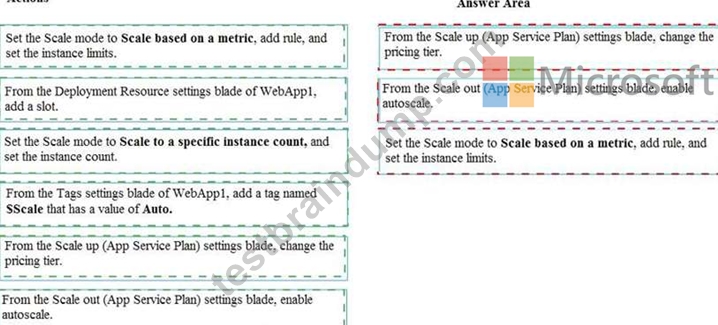
Explanation
Box 1: From the Scale up (App Service Plan) settings blade, change the pricing tier The B1 pricing tier only allows for 1 core. We must choose another pricing tier.
Box 2: From the Scale out (App Service Plan) settings blade, enable autoscale
1.
Log in to the Azure portal at http://portal.azure.com
1. Navigate to the App Service you would like to autoscale.
2. Select Scale out (App Service plan) from the menu
3. Click on Enable autoscale. This activates the editor for scaling rules.
Box 3: From the Scale mode to Scale based on metric, add a rule, and set the instance limits.
Click on Add a rule. This shows a form where you can create a rule and specify details of the scaling.
References:
https://azure.microsoft.com/en-us/pricing/details/app-service/windows/
https://blogs.msdn.microsoft.com/hsirtl/2017/07/03/autoscaling-azure-web-apps/
NEW QUESTION 188
You create the following resources in an Azure subscription:
* An Azure Container Registry instance named Registry1.
* An Azure Kubernetes Service (AKS) cluster named Cluster1.
You create a container image named App1 on your administrative workstation. You need to deploy App1 to Cluster1. What should you do first?
- A. Run the docker build command.
- B. Create a host pool on Cluster1.
- C. Run the az acr build command.
- D. Run the docker push command.
Answer: C
NEW QUESTION 189
You have an Azure subscription that contains a storage account.
You have an on-premises server named Server1 that runs Window Server 2016. Server1 has 2 TB of data.
You need to transfer the data to the storage account by using the Azure Import/Export service.
In which order should you perform the actions? To answer, move all actions from the list of actions to the answer area and arrange them in the correct order.
NOTE: More than one order of answer choices is correct. You will receive credit for any of the correct orders you select.
Answer:
Explanation:
At a high level, an import job involves the following steps:
Step 1: Attach an external disk to Server1 and then run waimportexport.exe Determine data to be imported, number of drives you need, destination blob location for your data in Azure storage.
Use the WAImportExport tool to copy data to disk drives. Encrypt the disk drives with BitLocker.
Step 2: From the Azure portal, create an import job.
Create an import job in your target storage account in Azure portal. Upload the drive journal files.
Step 3: Detach the external disks from Server1 and ship the disks to an Azure data center.
Provide the return address and carrier account number for shipping the drives back to you.
Ship the disk drives to the shipping address provided during job creation.
Step 4: From the Azure portal, update the import job
Update the delivery tracking number in the import job details and submit the import job.
The drives are received and processed at the Azure data center.
The drives are shipped using your carrier account to the return address provided in the import job.
References:
https://docs.microsoft.com/en-us/azure/storage/common/storage-import-export-service
NEW QUESTION 190
You have an Azure subscription that contains the resources in the following table.
Store1 contains a file share named data. Data contains 5,000 files.
You need to synchronize the files in the file share named data to an on-premises server named Server1.
Which three actions should you perform? Each correct answer presents part of the solution.
NOTE: Each correct selection is worth one point.
- A. Create a sync group
- B. Download an automation script
- C. Install the Azure File Sync agent on Server1
- D. Register Server1
- E. Create a container instance
Answer: A,C,D
Explanation:
Step 1 (C): Install the Azure File Sync agent on Server1
The Azure File Sync agent is a downloadable package that enables Windows Server to be synced with an Azure file share Step 2 (B): Register Server1.
Register Windows Server with Storage Sync Service
Registering your Windows Server with a Storage Sync Service establishes a trust relationship between your server (or cluster) and the Storage Sync Service.
Step 3 (E): Create a sync group and a cloud endpoint.
A sync group defines the sync topology for a set of files. Endpoints within a sync group are kept in sync with each other. A sync group must contain one cloud endpoint, which represents an Azure file share and one or more server endpoints. A server endpoint represents a path on registered server.
Reference:
https://docs.microsoft.com/en-us/azure/storage/files/storage-sync-files-deployment-guide Implement and manage storage Testlet 2 Case study This is a case study. Case studies are not timed separately. You can use as much exam time as you would like to complete each case. However, there may be additional case studies and sections on this exam. You must manage your time to ensure that you are able to complete all questions included on this exam in the time provided.
To answer the questions included in a case study, you will need to reference information that is provided in the case study. Case studies might contain exhibits and other resources that provide more information about the scenario that is described in the case study. Each question is independent of the other questions in this case study.
At the end of this case study, a review screen will appear. This screen allows you to review your answers and to make changes before you move to the next section of the exam. After you begin a new section, you cannot return to this section.
To start the case study
To display the first question in this case study, click the Next button. Use the buttons in the left pane to explore the content of the case study before you answer the questions. Clicking these buttons displays information such as business requirements, existing environment, and problem statements. If the case study has an All Information tab, note that the information displayed is identical to the information displayed on the subsequent tabs. When you are ready to answer a question, click the Question button to return to the question.
Overview
Contoso, Ltd. is a manufacturing company that has offices worldwide. Contoso works with partner organizations to bring products to market.
Contoso products are manufactured by using blueprint files that the company authors and maintains.
Existing Environment
Currently, Contoso uses multiple types of servers for business operations, including the following:
* File servers
* Domain controllers
* Microsoft SQL Server servers
Your network contains an Active Directory forest named contoso.com. All servers and client computers are joined to Active Directory.
You have a public-facing application named App1. App1 is comprised of the following three tiers:
* A SQL database
* A web front end
* A processing middle tier
Each tier is comprised of five virtual machines. Users access the web front end by using HTTPS only.
Requirements
Planned Changes
Contoso plans to implement the following changes to the infrastructure:
* Move all the tiers of App1 to Azure.
* Move the existing product blueprint files to Azure Blob storage.
* Create a hybrid directory to support an upcoming Microsoft Office 365 migration project.
Technical Requirements
Contoso must meet the following technical requirements:
* Move all the virtual machines for App1 to Azure.
* Minimize the number of open ports between the App1 tiers.
* Ensure that all the virtual machines for App1 are protected by backups.
* Copy the blueprint files to Azure over the Internet.
* Ensure that the blueprint files are stored in the archive storage tier.
* Ensure that partner access to the blueprint files is secured and temporary.
* Prevent user passwords or hashes of passwords from being stored in Azure.
* Use unmanaged standard storage for the hard disks of the virtual machines.
* Ensure that when users join devices to Azure Active Directory (Azure AD), the users use a mobile phone to verify their identity.
* Minimize administrative effort whenever possible.
User Requirements
Contoso identifies the following requirements for users:
* Ensure that only users who are part of a group named Pilot can join devices to Azure AD.
* Designate a new user named Admin1 as the service admin for the Azure subscription.
* Admin1 must receive email alerts regarding service outages.
* Ensure that a new user named User3 can create network objects for the Azure subscription.
NEW QUESTION 191
You have an on-premises file server named Server1 that runs Windows Server 2016.
You have an Azure subscription that contains an Azure file share.
You deploy an Azure File Sync Storage Sync Service, and you create a sync group.
You need to synchronize files from Server1 to Azure.
Which three actions should you perform in sequence? To answer, move the appropriate actions from the list of actions to the answer area and arrange them in the correct order.
Answer:
Explanation:
Explanation
Step 1: Install the Azure File Sync agent on Server1
The Azure File Sync agent is a downloadable package that enables Windows Server to be synced with an Azure file share Step 2: Register Server1.
Register Windows Server with Storage Sync Service
Registering your Windows Server with a Storage Sync Service establishes a trust relationship between your server (or cluster) and the Storage Sync Service.
Step 3: Add a server endpoint
Create a sync group and a cloud endpoint.
A sync group defines the sync topology for a set of files. Endpoints within a sync group are kept in sync with each other. A sync group must contain one cloud endpoint, which represents an Azure file share and one or more server endpoints. A server endpoint represents a path on registered server.
References: https://docs.microsoft.com/en-us/azure/storage/files/storage-sync-files-deployment-guide
NEW QUESTION 192
You have an availability set named AS1 that contains three virtual machines named VM1, VM2, and VM3.
You attempt to reconfigure VM1 to use a larger size. The operation fails and you receive an allocation failure message.
You need to ensure that the resize operation succeeds.
Which three actions should you perform in sequence? To answer, move the appropriate actions from the list of actions to the answer area and arrange them in the correct order.
Answer:
Explanation:
Explanation
Action 1: Stop VM1, VM2 and VM3
If the VM you wish to resize is part of an availability set, then you must stop all VMs in the availability set before changing the size of any VM in the availability set. The reason all VMs in the availability set must be stopped before performing the resize operation to a size that requires different hardware is that all running VMs in the availability set must be using the same physical hardware cluster. Therefore, if a change of physical hardware cluster is required to change the VM size then all VMs must be first stopped and then restarted one-by-one to a different physical hardware clusters.
Action 2: Resize VM1
Action 3: Start VM1, VM2, and VM3
References:
https://azure.microsoft.com/es-es/blog/resize-virtual-machines/
NEW QUESTION 193
You have an app named App1 that runs on two Azure virtual machines named VM1 and VM2.
You plan to implement an Azure Availability Set for App1. The solution must ensure that App1 is available during planned maintenance of the hardware hosting VM1 and VM2.
What should you include in the Availability Set?
- A. two update domains
- B. two fault domains
- C. one fault domain
- D. one update domain
Answer: A
Explanation:
Explanation
The hardware in a location is divided in to multiple update domains and fault domains. An update domain is a group of VMs and underlying physical hardware that can be rebooted at the same time. VMs in the same fault domain share common storage as well as a common power source and network switch.
Microsoft updates, which Microsoft refers to as planned maintenance events, sometimes require that VMs be rebooted to complete the update. To reduce the impact on VMs, the Azure fabric is divided into update domains to ensure that not all VMs are rebooted at the same time.https://docs.microsoft.com/en-us/azure/virtual-machines/windows/tutorial-availability-sets
NEW QUESTION 194
You have an Azure subscription that contains several virtual machines and an Azure Log Analytics workspace named Workspace1. You create a log search query as shown in the following exhibit.
Use the drop-down menus to select the answer choice that completes each statement based on the information presented in the graphic.
NOTE: Each correct selection is worth one point.
Answer:
Explanation: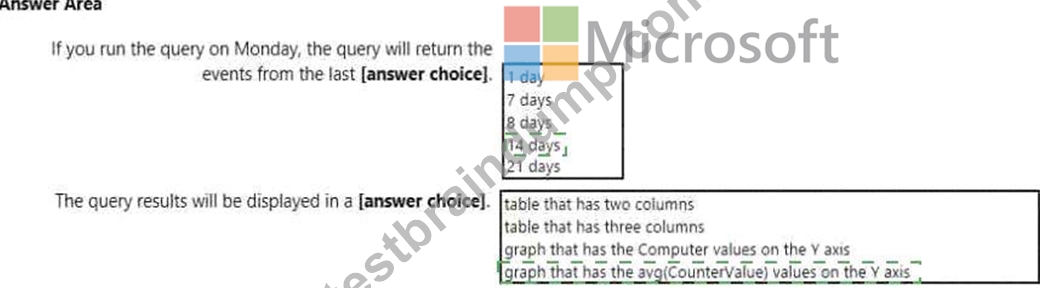
Explanation
Box 1: 14 days
Two weeks will be covered.
Note: Startofweek returns the start of the week containing the date, shifted by an offset, if provided.
Start of the week is considered to be a Sunday.
Endofweek returns the end of the week containing the date, shifted by an offset, if provided.
Last day of the week is considered to be a Saturday.
Box 2:
The render operator renders results in as graphical output. Timechart is a Line graph, where the first column is x-axis, and should be datetime. Other columns are y-axes. In this case the Y axis has avg(CounterValue) Values.
References:
https://docs.microsoft.com/en-us/azure/azure-monitor/log-query/log-query-overview
https://docs-analytics-eus.azurewebsites.net/queryLanguage/query_language_renderoperator.html
NEW QUESTION 195
You need to prepare the environment to ensure that the web administrators can deploy the web apps as quickly as possible.
Which three actions should you perform in sequence? To answer, move the appropriate actions from the list of actions to the answer area and arrange them in the correct order.
Answer:
Explanation: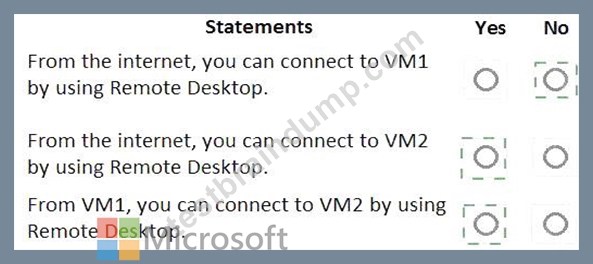
Explanation
Scenario:
1. Web administrators will deploy Azure web apps for the marketing department.
2. Each web app will be added to a separate resource group.
3. The initial configuration of the web apps will be identical.
4. The web administrators have permission to deploy web apps to resource groups.
Steps:
1 --> Create a resource group, and then deploy a web app to the resource group.
2 --> From the Automation script blade of the resource group , click Add to Library.
3 --> From the Templates service, select the template, and then share the template to the web administrators .
References:
https://docs.microsoft.com/en-us/azure/azure-resource-manager/templates/quickstart-create-templates-use-the-po
NEW QUESTION 196
You have an Active Directory domain named contoso.com that contains the objects shown in the following table.
The groups have the memberships shown in the following table.
OU1 and OU2 are synced to Azure Active Directory (Azure AD).
You modify the synchronization settings and remove OU1 from synchronization. You sync Active Directory and Azure AD.
Which objects are in Azure AD?
- A. User1, User2, Group1, User4, and Group2 only
- B. User4 and Group2 only
- C. User2, Group1, User4, and Group2 only
- D. User1, User2, User3, User4, Group1, and Group2
Answer: A
NEW QUESTION 197
You need to deploy two Azure web apps named WebApp1 and WebApp2. The web apps have the following requirements:
WebApp1 must be able to use staging slots
WebApp2 must be able to access the resources located on an Azure virtual network What is the least costly plan that you can use to deploy each web app? To answer, select the appropriate options in the answer area.
NOTE: Each correct selection is worth one point.
Answer:
Explanation:
References:
https://azure.microsoft.com/en-au/pricing/details/app-service/windows/
https://azure.microsoft.com/en-gb/pricing/details/app-service/plans/
NEW QUESTION 198
......
Updated Microsoft AZ-104 Dumps – PDF & Online Engine: https://www.testbraindump.com/AZ-104-exam-prep.html
AZ-104.pdf - Questions Answers PDF Sample Questions Reliable: https://drive.google.com/open?id=1SJUfc4muA4E7flaskkd1f8X02l7YxY31
