
D-PSC-MN-01 Tested & Approved Dell Storage Study Materials
Validate your Skills with Updated Dell Storage Exam Questions & Answers and Test Engine
NEW QUESTION # 75
What are the essential verifications after preparing a PowerScale node for operation? (Select two)
- A. License keys are validated.
- B. Cluster membership is intact.
- C. Data rebalancing is complete.
- D. There are no pending alerts.
Answer: B,D
NEW QUESTION # 76
A platform engineer has connected to a Dell EMC PowerScale F600 node using a serial connection. The session is unresponsive.
What action should the engineer take?
- A. Enable the serial port from the front panel menu
- B. Configure the cluster before connecting to the node
- C. Connect to the primary node of the pair
- D. Check the settings of the serial connection
Answer: D
Explanation:
When connecting to a Dell EMC PowerScale F600 node via a serial connection and the session is unresponsive, the most common issue is incorrect serial connection settings.
Key Points:
* Serial Connection Settings:
* The serial console requires specific settings to communicate properly:
* Baud rate: 115200
* Data bits: 8
* Parity: None
* Stop bits: 1
* Flow control: None
* Incorrect settings will result in an unresponsive or garbled session.
* Troubleshooting Steps:
* Verify that the serial connection parameters match the required settings.
* Ensure that the correct serial port is being used.
* Check the physical connection for loose cables or faulty adapters.
* Other Considerations:
* The serial port on the node does not need to be enabled from the front panel.
* Connecting to the primary node or configuring the cluster is not necessary for serial console access.
Dell PowerScale References:
* Dell EMC PowerScale Hardware Installation Guide:
* Appendix on Console Access:
* Provides the correct serial connection settings for accessing the node console.
* Offers troubleshooting tips for common connection issues.
* Best Practices:
* Use reliable serial communication software (e.g., PuTTY, Tera Term).
* Confirm that the serial cable and any USB-to-serial adapters are functioning properly.
NEW QUESTION # 77
What does the process of smartfailing a node involve?
- A. Temporarily removing the node from service
- B. Transferring data to other nodes in the cluster
- C. Physically replacing the node hardware
- D. Updating the cluster configuration database
Answer: A
NEW QUESTION # 78
What does a terracotta colored handle indicate on Dell PowerScale Gen6 hardware?
- A. The node must be shut down for maintenance procedures.
- B. The node can remain online when replacing a hardware component.
- C. The FRU must be replaced.
- D. The component must not be removed while hardware is online.
Answer: D
Explanation:
In Dell PowerScale Gen6 hardware, terracotta-colored handles indicate that a component is not hot- swappable. This means the component must not be removed or replaced while the node is powered on and operational. Removing such components while the system is online could lead to data loss or hardware damage.
* Color-Coded Handles in Gen6 Hardware:
* Blue Handles:
* Indicate components that are hot-swappable.
* Can be safely removed or replaced while the node is online.
* Terracotta (Orange) Handles:
* Signify components that arenothot-swappable.
* Require the node to be powered down before removal or replacement.
* Components with Terracotta Handles:
* Examples Include:
* Power supplies (in some configurations).
* Certain internal components like fans or system boards.
* Safety Precautions:
* To prevent electrical hazards or system instability, these components should only be serviced when the node is shut down.
* Maintenance Procedures:
* Shutting Down the Node:
* Use the isi_for_array -s 'shutdown -p now' command to safely power down the node.
* Ensure that the node is properly removed from the cluster to prevent data access issues.
* Physical Removal:
* Once powered down, the component with the terracotta handle can be safely removed.
Dell PowerScale References:
* Dell EMC PowerScale Hardware Installation Guide:
* Details on hardware components, color-coded handles, and their significance.
* Dell EMC PowerScale OneFS Best Practices:
* Provides guidelines on maintenance procedures and safety precautions.
* Field Service Manuals:
* Offer step-by-step instructions for replacing components and emphasize the importance of adhering to handle color indications.
NEW QUESTION # 79
What is a critical aspect of external networking setup for PowerScale clusters?
- A. Establishing redundant connections
- B. Ensuring compatibility with legacy systems
- C. Configuring VLANs
- D. Implementing Quality of Service (QoS)
Answer: A
NEW QUESTION # 80
How can an administrator verify that a node is successfully shut down?
- A. Execute the isi status -q command and see that the node is in an A-- status.
- B. Verify the LEDs on the front panel are not lit.
- C. Try to access a share on the node and verify the share is inaccessible.
- D. Execute the isi status -q command and see that the node is in a D--- status.
Answer: D
NEW QUESTION # 81
Which resource should be consulted before performing any Dell PowerScale platform maintenance activities?
- A. Dell iDRAC Service Module
- B. Dell SolVe Online
- C. Dell Technical Support
- D. OneFS logs and error messages
Answer: B
Explanation:
Before performing any maintenance activities on a Dell PowerScale platform, it is crucial to consultDell SolVe Online. This tool provides comprehensive, step-by-step procedures, best practices, and necessary precautions for servicing Dell EMC equipment.
* Dell SolVe Online Overview:
* Service and Procedures Resource:
* An online platform offering detailed service procedures for Dell EMC products.
* Customized Instructions:
* Generates procedure guides tailored to specific tasks and equipment models.
* Safety and Compliance:
* Includes safety warnings and regulatory compliance information.
* Importance in Maintenance Activities:
* Accurate Procedures:
* Ensures that maintenance tasks are performed correctly, reducing the risk of errors.
* Updated Information:
* Provides the latest procedures reflecting current best practices and product updates.
* Resource for Technicians:
* Essential for both Dell EMC technicians and customers performing self-maintenance.
* Using Dell SolVe Online:
* Accessing the Tool:
* Available at the Dell support website (requires login credentials).
* Selecting the Product:
* Choose the specific PowerScale model to get relevant procedures.
* Generating Procedures:
* Select the desired maintenance activity to receive a detailed guide.
Why Other Options Are Less Suitable:
* B. Dell Technical Support:
* While valuable, it's more reactive and may not provide step-by-step procedures without direct engagement.
* C. Dell iDRAC Service Module:
* Used for system management and monitoring, not for procedural guidance.
* D. OneFS Logs and Error Messages:
* Useful for troubleshooting but do not provide maintenance procedures.
Dell PowerScale References:
* Dell SolVe Online Portal:
* The primary resource for service procedures.
* Dell EMC PowerScale Maintenance Guides:
* Referenced within SolVe Online procedures.
* Support Documentation:
* Accessible through Dell's support site, often linked within SolVe Online.
NEW QUESTION # 82
When should the customer engineer document and register a Dell PowerScale system in the install base record?
- A. Before OneFS has been initialized, configured, and updated
- B. After OneFS has been initialized and configured
- C. Before racking the system
- D. After racking the system
Answer: D
NEW QUESTION # 83
During the PowerScale hardware installation, why is it important to follow a structured cabling approach?
- A. To comply with industry cabling standards
- B. To reduce electromagnetic interference
- C. To optimize air flow within the rack
- D. To facilitate future hardware upgrades and maintenance
Answer: D
NEW QUESTION # 84
How do external networking requirements for a PowerScale cluster typically differ from internal requirements?
- A. Increased security and access controls
- B. Simpler routing and switching protocols
- C. Higher bandwidth and lower latency
- D. Use of public IP addresses
Answer: A
NEW QUESTION # 85
What accurately describes the InfiniBand cable support?
- A. Supports QSFP to QSFP cabling or QSFP to CX4 cabling
- B. Supports QSFP to CX4 cabling only
- C. Supports QSFP to QSFP cabling only
- D. Supports front-end customer external traffic
Answer: C
Explanation:
In Dell EMC PowerScale systems that use InfiniBand for back-end networking, the cabling standards are specific to ensure optimal performance and compatibility.
InfiniBand Cable Support:
* QSFP to QSFP Cabling Only:
* QSFP (Quad Small Form-factor Pluggable):
* A compact, hot-pluggable transceiver used for high-speed InfiniBand networking.
* Standard for PowerScale:
* PowerScale systems utilizing InfiniBand support QSFP to QSFP cables exclusively.
* Ensures high-bandwidth, low-latency communication between nodes.
Why Option A is Correct:
* Exclusive Support:
* QSFP to QSFP is the only supported cabling method for InfiniBand in these systems.
* Compatibility and Performance:
* Using QSFP to QSFP cables guarantees compatibility with node interfaces and optimal network performance.
Why Other Options Are Incorrect:
* Option B (QSFP to QSFP or QSFP to CX4):
* QSFP to CX4 is not supported; CX4 is an older connector type not compatible with current PowerScale InfiniBand configurations.
* Option C (QSFP to CX4 only):
* Incorrect, as QSFP to CX4 cabling is not used in PowerScale systems for InfiniBand.
* Option D (Supports front-end customer external traffic):
* InfiniBand is used for internal back-end networking, not for front-end external customer traffic, which uses Ethernet connections.
Dell PowerScale References:
* Dell EMC PowerScale Networking Guide:
* Back-End Network Cabling Section:
* Specifies the use of QSFP to QSFP cables for InfiniBand connectivity.
* Supported Cable Types:
* Lists the approved cables and transceivers for InfiniBand networks.
* Hardware Installation Guides:
* Provide detailed instructions and diagrams for cabling using QSFP to QSFP connections.
Best Practices:
* Use Certified Cables:
* Always use Dell EMC-approved QSFP to QSFP cables to ensure reliability.
* Proper Installation:
* Follow the recommended procedures for connecting and securing InfiniBand cables.
* Cable Management:
* Organize cables to prevent strain and maintain proper airflow.
Additional Notes:
* InfiniBand Usage:
* Provides high-speed communication between nodes for data replication and cluster operations.
* Transition to Ethernet:
* Newer PowerScale models may use Ethernet back-end networking instead of InfiniBand.
NEW QUESTION # 86
Which tools or methods are critical for ensuring compliance and integrating SRS within a PowerScale cluster configuration? (Select two)
- A. SyncIQ for data replication
- B. Security and Compliance Suite
- C. SRS for remote support
- D. InsightIQ for performance monitoring
Answer: B,C
NEW QUESTION # 87
What type of upgrade on a Dell PowerScale cluster requires the least amount of time?
- A. Automatic
- B. Rolling
- C. Simultaneous
- D. Parallel
Answer: C
Explanation:
Asimultaneous upgradeon a Dell PowerScale cluster involves upgrading all nodes at the same time. This method requires the least amount of time compared to other upgrade types because it minimizes the total duration by handling the upgrade process concurrently across the entire cluster.
Types of Upgrades:
* Simultaneous Upgrade:
* Definition:All nodes are upgraded at the same time.
* Advantages:
* Fastest upgrade method.
* Reduces total upgrade time significantly.
* Disadvantages:
* Requires cluster downtime; not suitable for environments that need continuous availability.
* Rolling Upgrade:
* Definition:Nodes are upgraded one at a time or in small groups.
* Advantages:
* No cluster downtime; services remain available.
* Disadvantages:
* Takes longer to complete as each node is upgraded sequentially.
* Parallel Upgrade:
* Definition:Nodes are upgraded in parallel batches.
* Advantages:
* Balances upgrade speed and availability.
* Disadvantages:
* May still require some service interruption.
* Automatic Upgrade:
* Definition:The upgrade process is automated but follows the rolling or parallel methodology.
* Advantages:
* Reduces manual intervention.
* Disadvantages:
* Upgrade time depends on the underlying method used (rolling or parallel).
Why Simultaneous Upgrade Requires the Least Amount of Time:
* Concurrent Processing:Upgrading all nodes at once leverages parallelism, drastically reducing the total time needed.
* No Sequential Steps:Eliminates the wait time associated with upgrading nodes one after another.
* Use Case Considerations:Suitable for non-production clusters or environments where downtime is acceptable.
Important Considerations:
* Cluster Downtime:Simultaneous upgrades will render the cluster unavailable during the process.
* Risk Management:Any issues during the upgrade can affect the entire cluster; thorough planning and backups are essential.
References:
* Dell PowerScale OneFS Upgrade Planning and Process Guide- Details on upgrade methods and best practices.
* Dell PowerScale Administration Guide- Instructions and considerations for performing cluster upgrades.
* Best Practices for OneFS Upgrades- Recommendations for selecting the appropriate upgrade method based on environment needs.
NEW QUESTION # 88
What is a crucial step when installing subcomponents in a PowerScale rack?
- A. Following the manufacturer's recommended sequence for installation
- B. Testing each subcomponent individually before installation
- C. Documenting the serial numbers of all components
- D. Configuring the network settings for each subcomponent
Answer: A
NEW QUESTION # 89
A platform engineer is adding three F600 nodes to a Dell PowerScale cluster.
What is a good practice when adding the nodes?
- A. Use the isi network output to show progress.
- B. Join new nodes simultaneously.
- C. Wait 5 minutes between each additional node.
- D. Manually reboot each node before joining.
Answer: C
NEW QUESTION # 90
What should the platform engineer do to retain critical information when replacing a system board on a Dell EMC PowerScale F200 node?
- A. Flash the BIOS
- B. Run isi_node_restore -force
- C. Run EasyRestore
- D. Reinstall the PowerScale license
Answer: C
Explanation:
When replacing a system board (motherboard) on a Dell EMC PowerScale F200 node, critical system information such as the node's identity, network configuration, and cluster membership must be preserved.
Key Points:
* EasyRestore Utility:
* EasyRestore is a utility provided by Dell EMC to restore critical node information after hardware replacements like system boards.
* It automates the process of restoring the node's identity and configuration without manual intervention.
* Retention of Critical Information:
* Running EasyRestore ensures that the node re-integrates into the cluster with the correct settings.
* It restores the node's serial number, GUID, and other essential identifiers.
* Procedure After System Board Replacement:
* After physically replacing the system board, the platform engineer should boot the node and run EasyRestore.
* This process retrieves the necessary information from the node's backup flash storage.
Dell PowerScale References:
* Dell EMC PowerScale OneFS Administration Guide:
* Chapter on Hardware Replacement Procedures:
* Describes the steps to replace a system board and the importance of running EasyRestore afterward.
* Details how EasyRestore works and what information it restores.
* Technical Advisories:
* Emphasize that failure to run EasyRestore may result in the node not functioning correctly within the cluster.
* Incorrect Options:
* Option A (isi_node_restore -force)is not the correct utility for this task.
* Option B (Flash the BIOS)is unnecessary as the BIOS is part of the system board.
* Option C (Reinstall the PowerScale license)is not required because licensing is managed at the cluster level, not per node.
NEW QUESTION # 91
What are essential steps when creating a new PowerScale cluster?
- A. Configuring network settings
- B. Enabling compliance features
- C. Assigning cluster name and IP pool
- D. Setting up data protection levels
Answer: A,C,D
NEW QUESTION # 92
What distinctive feature does PowerScale Gen 6.5 offer compared to Gen 6 nodes?
- A. Reduced power consumption
- B. Higher storage density
- C. Enhanced data deduplication capabilities
- D. Legacy networking support
Answer: B
NEW QUESTION # 93
Match each Dell PowerScale node to its description.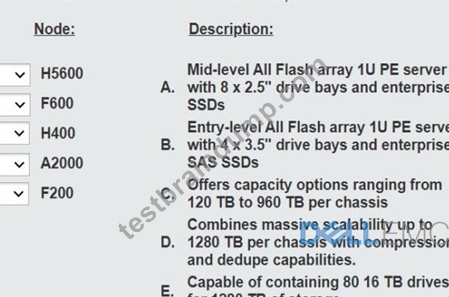
Answer:
Explanation: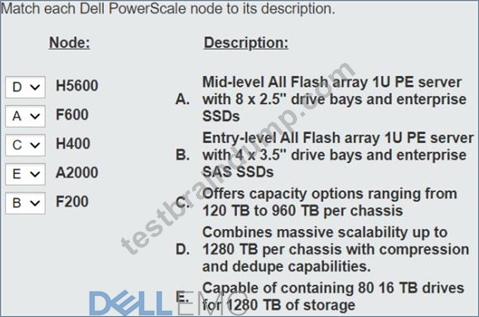
NEW QUESTION # 94
Refer to the exhibit.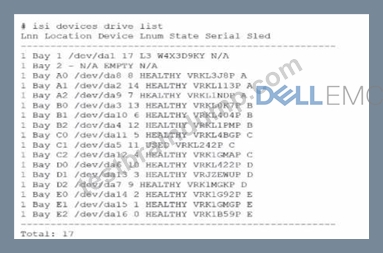
An engineer replaced the drive in C1. They run the isi devices drive list command and obtain the output that is shown.
What action must the engineer take?
- A. Run the isi devices drive format C1command.
- B. Update the drive firmware.
- C. Contact Dell support.
- D. Run the 1 = 1 devices drive add c1command.
Answer: A
Explanation:
In the output of the isi devices drive list command shown in the exhibit, the drive in location C1 is marked as
"USED," with the serial number VRKL242P. This indicates that the drive has been replaced but has not yet been initialized or formatted for use within the PowerScale cluster.
To make the drive usable, it must be formatted. The correct procedure to follow is to use the isi devices drive format command, specifying the drive location (C1 in this case). This will prepare the drive for use in the cluster, ensuring that it is recognized and available for OneFS to start writing data to it.
Steps to format the drive:
* Log in to the OneFS cluster using an SSH session with an account that has the necessary privileges.
* Run the following command to format the new drive:
bash
Copy code
isi devices drive format C1
This command will format the drive located at C1, making it available for use in the cluster.
* After the format is complete, verify that the drive is now in a HEALTHY state by running:
isi devices drive list
This should display the new status of the drive as HEALTHY, indicating that it has been successfully formatted and is ready for data operations.
This process is outlined in Dell's PowerScale Administration Guide and ensures the correct initialization of new or replaced drives.
NEW QUESTION # 95
What is a consideration when reimaging a Dell PowerScale node?
- A. Reimaging does not erase the data and is faster.
- B. Perform on a node mat is not a member of a cluster.
- C. Perform on a node that Is a member of a cluster.
- D. Use the rolling reimage update to retain the current OneFS version.
Answer: B
Explanation:
When reimaging a Dell PowerScale node, an important consideration is toperform the reimage on a node that is not a member of a cluster. Reimaging a node that is part of a cluster can lead to data loss and cluster instability. Therefore, the recommended practice is to remove the node from the cluster before initiating the reimage process.
1. Understanding Reimaging:
* Reimaging Process:
* Reimaging involves reinstalling the OneFS operating system on a node.
* It effectively returns the node to a factory-default state.
* All data and configurations on the node are erased during the process.
* Purpose of Reimaging:
* Used to address software corruption, persistent errors, or to prepare a node for redeployment.
2. Importance of Performing Reimage on a Non-Clustered Node:
* Data Protection:
* Reimaging a node within a cluster can disrupt data protection schemes.
* The node's data may not be fully replicated elsewhere, risking data loss.
* Cluster Integrity:
* Removing the node ensures that the cluster remains stable and avoids potential conflicts.
* The cluster's metadata and configuration remain consistent.
* Recommended Procedure:
* Step 1:Remove the node from the cluster using the appropriate OneFS commands or the WebUI.
* Step 2:Confirm that the cluster recognizes the node removal and data has been reprotected.
* Step 3:Proceed with reimaging the node.
3. Why Other Options Are Less Suitable:
* Option B: Reimaging does not erase the data and is faster.
* Incorrect; reimaging erases all data and configurations on the node.
* It is not necessarily faster and involves careful steps to ensure data integrity.
* Option C: Perform on a node that is a member of a cluster.
* Not recommended due to risks of data loss and cluster instability.
* Best practices dictate removing the node first.
* Option D: Use the rolling reimage update to retain the current OneFS version.
* There is no "rolling reimage update" process.
* Rolling upgrades are for updating OneFS versions, not reimaging nodes.
4. Dell PowerScale Best Practices:
* Node Removal Before Reimaging:
* Always remove the node from the cluster before reimaging.
* Ensure the cluster is healthy and data is fully protected.
* Backup Critical Data:
* Verify that critical data is backed up or replicated.
5. Dell PowerScale References:
* Dell EMC PowerScale OneFS Administration Guide:
* Provides instructions on managing nodes and reimaging procedures.
* Dell EMC PowerScale OneFS Administration Guide
* Dell EMC PowerScale OneFS CLI Administration Guide:
* Details commands for removing nodes and reimaging.
* Dell EMC PowerScale OneFS CLI Guide
* Knowledge Base Articles:
* Article ID 000180125:"Best Practices for Reimaging PowerScale Nodes"
* Article ID 000180126:"Procedures for Safely Reimaging a Node"
NEW QUESTION # 96
Which statement is accurate regarding Dell EMC PowerScale hardware platforms?
- A. Gen 6.5 F200 nodes come in 4U rack-mountable chassis.
- B. Gen 6 node hardware comes only in 4U rack-mountable chassis.
- C. Gen 6 node hardware comes in 2U or 4U rack-mountable chassis.
- D. Gen 6.5 F600 nodes can only be added as node pairs.
Answer: C
Explanation:
Dell EMC PowerScale Gen 6 nodes are available in different form factors to meet various storage and performance needs.
Gen 6 Node Form Factors:
* 2U Chassis:
* Models like the F800 and H500.
* Designed for high performance with moderate capacity.
* 4U Chassis:
* Models like the A2000.
* Offer high-density storage options.
Clarifications:
* Option A:Incorrect, as Gen 6 nodes come in both 2U and 4U chassis.
* Option B:Incorrect, Gen 6.5 F200 nodes come in a 1U chassis.
* Option D:Incorrect, F600 nodes can be added individually, not only as pairs.
Dell PowerScale References:
* Dell EMC PowerScale Technical Specifications:
* Lists models with their corresponding chassis sizes.
* Provides detailed hardware descriptions.
* Best Practices:
* Plan rack space according to the chassis size of the nodes being deployed.
* Consider power and cooling requirements based on node specifications.
NEW QUESTION # 97
What type of NIC can be used for the external network on a Dell PowerScale F600 node?
- A. 1/10 GbE
- B. 25/40 GbE
- C. 10/100 GbE
- D. 10/25 GbE
Answer: D
Explanation:
The Dell PowerScale F600 node supports 10/25 GbE network interface cards (NICs) for the external network connections. These NICs provide high-speed connectivity suitable for the performance capabilities of the F600, which is an all-flash node designed for demanding workloads.
* Dell PowerScale F600 Networking Options:
* The F600 comes with network interfaces that support both 10 GbE and 25 GbE speeds.
* These interfaces use SFP28 transceivers, which are compatible with both 10 GbE and 25 GbE connections.
* Supported NIC Types:
* 10/25 GbE NICs:
* Allow flexibility in network configurations.
* Enable integration with existing 10 GbE networks while providing an upgrade path to 25 GbE.
* Not Supporting 1 GbE or 40/100 GbE as Primary External Connections:
* The F600 does not support 1 GbE as it would be a bottleneck for an all-flash node.
* While the F600 may have 100 GbE capabilities for backend or other uses, the primary external network interfaces are 10/25 GbE.
* Benefits of 10/25 GbE Connectivity:
* Performance:
* Provides sufficient bandwidth for high-performance applications.
* Scalability:
* Easy to scale up network speeds as infrastructure upgrades from 10 GbE to 25 GbE.
* Cost-Effectiveness:
* Offers a balance between performance and cost compared to higher-speed options like 40 GbE or 100 GbE.
Dell PowerScale References:
* Dell EMC PowerScale F600 Specification Sheet:
* Details the networking capabilities and supported NICs.
* Dell EMC PowerScale Network Deployment Guide:
* Provides guidelines on network configurations and best practices for F600 nodes.
* Hardware Installation Guides:
* Outline the installation and configuration of NICs for F600 nodes.
NEW QUESTION # 98
......
D-PSC-MN-01 [Sep-2026] Newly Released] D-PSC-MN-01 Exam Questions For You To Pass: https://www.testbraindump.com/D-PSC-MN-01-exam-prep.html
For your comfort, TestBraindump provides you the convenience of free Dell Storage braindumps demo: https://drive.google.com/open?id=1jkq0wSJsM_INpdj8RaWgqRxzllUWy6T1
