
[May 26, 2026] Prepare For The Databricks-Certified-Professional-Data-Engineer Question Papers In Advance
Databricks-Certified-Professional-Data-Engineer PDF Dumps Real 2026 Recently Updated Questions
NEW QUESTION # 49
The Databricks CLI is use to trigger a run of an existing job by passing the job_id parameter. The response that the job run request has been submitted successfully includes a filed run_id.
Which statement describes what the number alongside this field represents?
- A. The globally unique ID of the newly triggered run.
- B. The number of times the job definition has been run in the workspace.
- C. The job_id is returned in this field.
- D. The job_id and number of times the job has been are concatenated and returned.
Answer: A
Explanation:
When triggering a job run using the Databricks CLI, the run_id field in the response represents a globally unique identifier for that particular run of the job. This run_id is distinct from the job_id. While the job_id identifies the job definition and is constant across all runs of that job, the run_id is unique to each execution and is used to track and query the status of that specific job run within the Databricks environment. This distinction allows users to manage and reference individual executions of a job directly.
NEW QUESTION # 50
Which of the following python statements can be used to replace the schema name and table name in the query?
- A. 1.table_name = "sales"
2.query = f"select * from + schema_name +"."+table_name" - B. 1.table_name = "sales"
2.query = "select * from {schema_name}.{table_name}" - C. 1.table_name = "sales"
2.query = f"select * from {schema_name}.{table_name}" - D. 1.table_name = "sales"
2.schema_name = "bronze"
3.query = f"select * from schema_name.table_name"
Answer: C
Explanation:
Explanation
The answer is
1.table_name = "sales"
2.query = f"select * from {schema_name}.{table_name}"
It is always best to use f strings to replace python variables, rather than using string concatenation.
NEW QUESTION # 51
How to determine if a table is a managed table vs external table?
- A. Run SQL command DESCRIBE EXTENDED table_name and check type
- B. Run SQL command SHOW TABLES to see the type of the table
- C. All external tables are stored in data lake, managed tables are stored in DELTA lake
- D. All managed tables are stored in unity catalog
- E. Run IS_MANAGED('table_name') function
Answer: A
Explanation:
Explanation
The answer is Run SQL command DESCRIBE EXTENDED table_name and check type Example of External table Graphical user interface, text, application Description automatically generated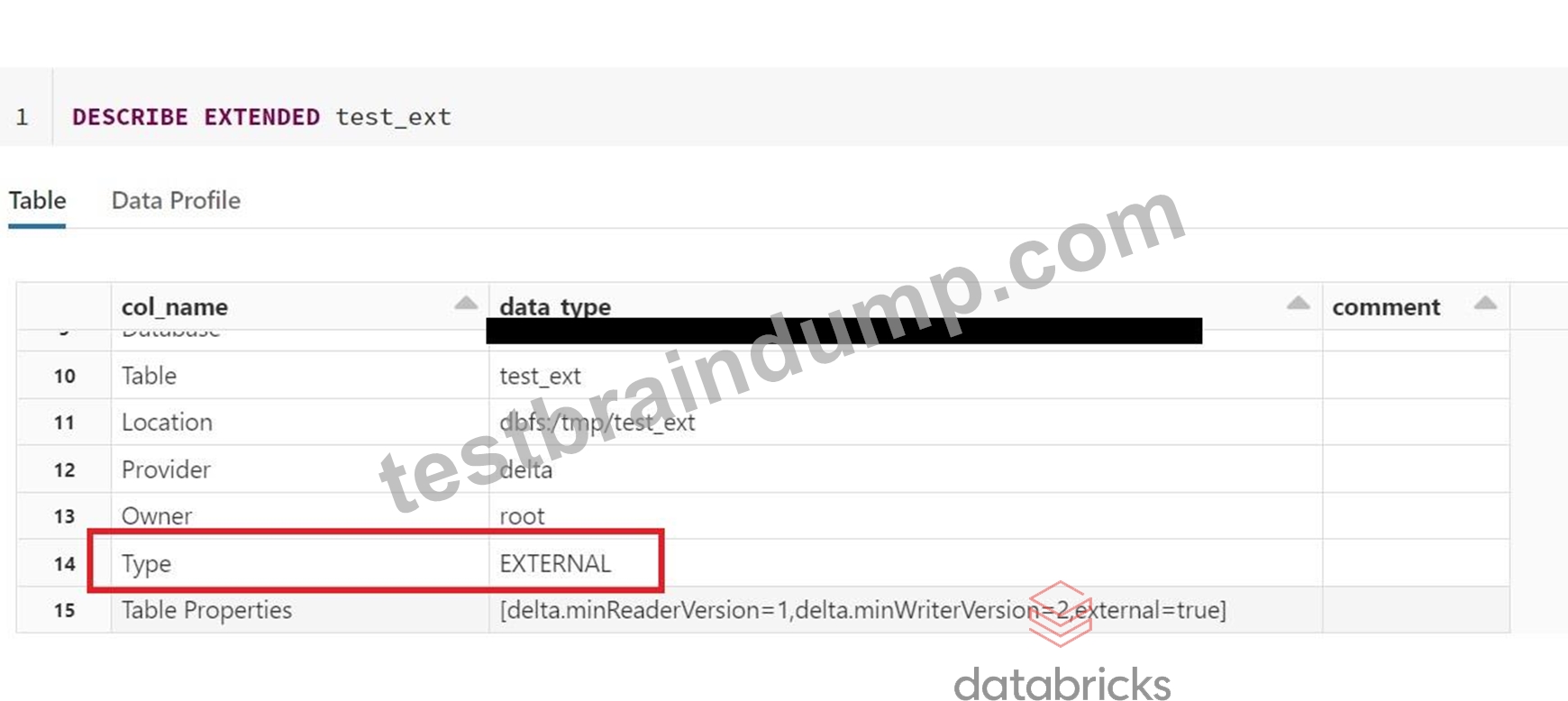
Example of managed table
Graphical user interface, text, application, Teams Description automatically generated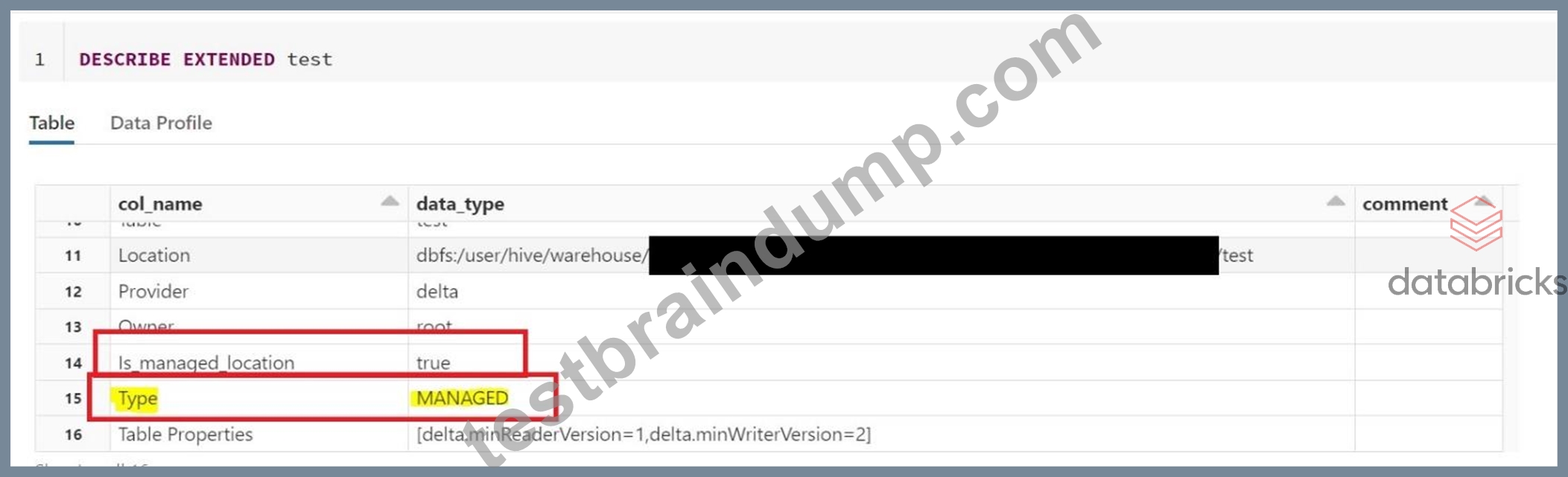
NEW QUESTION # 52
A Databricks job has been configured with 3 tasks, each of which is a Databricks notebook. Task A does not depend on other tasks. Tasks B and C run in parallel, with each having a serial dependency on Task A.
If task A fails during a scheduled run, which statement describes the results of this run?
- A. Tasks B and C will be skipped; some logic expressed in task A may have been committed before task failure.
- B. Unless all tasks complete successfully, no changes will be committed to the Lakehouse; because task A failed, all commits will be rolled back automatically.
- C. Tasks B and C will be skipped; task A will not commit any changes because of stage failure.
- D. Because all tasks are managed as a dependency graph, no changes will be committed to the Lakehouse until all tasks have successfully been completed.
- E. Tasks B and C will attempt to run as configured; any changes made in task A will be rolled back due to task failure.
Answer: A
Explanation:
When a Databricks job runs multiple tasks with dependencies, the tasks are executed in a dependency graph.
If a task fails, the downstream tasks that depend on it are skipped and marked as Upstream failed. However, the failed task may have already committed some changes to the Lakehouse before the failure occurred, and those changes are not rolled back automatically. Therefore, the job run may result in a partial update of the Lakehouse. To avoid this, you can use the transactional writes feature of Delta Lake to ensure that the changes are only committed when the entire job run succeeds. Alternatively, you can use the Run if condition to configure tasks to run even when some or all of their dependencies have failed, allowing your job to recover from failures and continue running. References:
* transactional writes: https://docs.databricks.com/delta/delta-intro.html#transactional-writes
* Run if: https://docs.databricks.com/en/workflows/jobs/conditional-tasks.html
NEW QUESTION # 53
A table in the Lakehouse namedcustomer_churn_paramsis used in churn prediction by the machine learning team. The table contains information about customers derived from a number of upstream sources. Currently, the data engineering team populates this table nightly by overwriting the table with the current valid values derived from upstream data sources.
The churn prediction model used by the ML team is fairly stable in production. The team is only interested in making predictions on records that have changed in the past 24 hours.
Which approach would simplify the identification of these changed records?
- A. Replace the current overwrite logic with a merge statement to modify only those records that have changed; write logic to make predictions on the changed records identified by the change data feed.
- B. Convert the batch job to a Structured Streaming job using the complete output mode; configure a Structured Streaming job to read from the customer_churn_params table and incrementally predict against the churn model.
- C. Calculate the difference between the previous model predictions and the current customer_churn_params on a key identifying unique customers before making new predictions; only make predictions on those customers not in the previous predictions.
- D. Apply the churn model to all rows in the customer_churn_params table, but implement logic to perform an upsert into the predictions table that ignores rows where predictions have not changed.
- E. Modify the overwrite logic to include a field populated by calling
spark.sql.functions.current_timestamp() as data are being written; use this field to identify records written on a particular date.
Answer: B
Explanation:
Explanation
This is the correct answer because the JSON posted to the Databricks REST API endpoint 2.0/jobs/create defines a new job with an existing cluster id and a notebook task, but also specifies a new cluster spec with some configurations. According to the documentation, if both an existing cluster id and a new cluster spec are provided, then a new cluster will be created for each run of the job with those configurations, and then terminated after completion. Therefore, the logic defined in the referenced notebook will be executed three times on new clusters with those configurations. Verified References: [Databricks Certified Data Engineer Professional], under "Monitoring & Logging" section; Databricks Documentation, under
"JobsClusterSpecNewCluster" section.
NEW QUESTION # 54
Which statement characterizes the general programming model used by Spark Structured Streaming?
- A. Structured Streaming relies on a distributed network of nodes that hold incremental state values for cached stages.
- B. Structured Streaming is implemented as a messaging bus and is derived from Apache Kafka.
- C. Structured Streaming models new data arriving in a data stream as new rows appended to an unbounded table.
- D. Structured Streaming leverages the parallel processing of GPUs to achieve highly parallel data throughput.
- E. Structured Streaming uses specialized hardware and I/O streams to achieve sub-second latency for data transfer.
Answer: C
Explanation:
Explanation
This is the correct answer because it characterizes the general programming model used by Spark Structured Streaming, which is to treat a live data stream as a table that is being continuously appended. This leads to a new stream processing model that is very similar to a batch processing model, where users can express their streaming computation using the same Dataset/DataFrame API as they would use for static data. The Spark SQL engine will take care of running the streaming query incrementally and continuously and updating the final result as streaming data continues to arrive. Verified References: [Databricks Certified Data Engineer Professional], under "Structured Streaming" section; Databricks Documentation, under "Overview" section.
NEW QUESTION # 55
A table named user_ltv is being used to create a view that will be used by data analysis on various teams.
Users in the workspace are configured into groups, which are used for setting up data access using ACLs.
The user_ltv table has the following schema: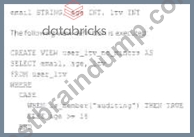
An analyze who is not a member of the auditing group executing the following query:
Which result will be returned by this query?
- A. All columns will be displayed normally for those records that have an age greater than 18; records not meeting this condition will be omitted.
- B. All columns will be displayed normally for those records that have an age greater than 17; records not meeting this condition will be omitted.
- C. All age values less than 18 will be returned as null values all other columns will be returned with the values in user_ltv.
- D. All records from all columns will be displayed with the values in user_ltv.
Answer: A
Explanation:
Given the CASE statement in the view definition, the result set for a user not in the auditing group would be constrained by the ELSE condition, which filters out records based on age. Therefore, the view will return all columns normally for records with an age greater than 18, as users who are not in the auditing group will not satisfy the is_member('auditing') condition. Records not meeting the age > 18 condition will not be displayed.
NEW QUESTION # 56
You have accidentally deleted records from a table called transactions, what is the easiest way to restore the records deleted or the previous state of the table? Prior to deleting the version of the table is 3 and after delete the version of the table is 4.
- A. COPY OVERWRITE transactions from VERSION as of 3
- B. RESTORE TABLE transactions TO VERSION as of 3
C .
1.INSERT INTO OVERWRITE transactions
2.SELECT * FROM transactions VERSION AS OF 3
3.MINUS
4.SELECT * FROM transactions - C. RESTORE TABLE transactions FROM VERSION as of 4
- D. 1.INSERT INTO OVERWRITE transactions
2.SELECT * FROM transactions VERSION AS OF 4
3.INTERSECT
4.SELECT * FROM transactions
Answer: B
Explanation:
Explanation
RESTORE (Databricks SQL) | Databricks on AWS
1.RESTORE [TABLE] table_name [TO] time_travel_version
Time travel supports using timestamp or version number
1.time_travel_version
2. { TIMESTAMP AS OF timestamp_expression |
3. VERSION AS OF version }
*timestamp_expression can be any one of:
*'2018-10-18T22:15:12.013Z', that is, a string that can be cast to a timestamp
*cast('2018-10-18 13:36:32 CEST' as timestamp)
*'2018-10-18', that is, a date string
*current_timestamp() - interval 12 hours
*date_sub(current_date(), 1)
*Any other expression that is or can be cast to a timestamp
NEW QUESTION # 57
A dataset has been defined using Delta Live Tables and includes an expectations clause:
1. CONSTRAINT valid_timestamp EXPECT (timestamp > '2020-01-01')
What is the expected behaviour when a batch of data containing data that violates these constraints is
processed?
- A. Records that violate the expectation are dropped from the target dataset and loaded into a quarantine table
- B. Records that violate the expectation are added to the target dataset and flagged as in-valid in a field added to the target dataset
- C. Records that violate the expectation cause the job to fail
- D. Records that violate the expectation are dropped from the target dataset and recorded as invalid in the event log
- E. Records that violate the expectation are added to the target dataset and recorded as invalid in the event log
Answer: E
NEW QUESTION # 58
The below spark command is looking to create a summary table based customerId and the number of times the customerId is present in the event_log delta table and write a one-time micro-batch to a summary table, fill in the blanks to complete the query.
1.spark._________
2. .format("delta")
3. .table("events_log")
4. .groupBy("customerId")
5. .count()
6. ._______
7. .format("delta")
8. .outputMode("complete")
9. .option("checkpointLocation", "/tmp/delta/eventsByCustomer/_checkpoints/")
10. .trigger(______)
11. .table("target_table")
- A. writeStream, processingTime = once
- B. writeStream, readStream, once = True
- C. readStream, writeStream, once = True
- D. readStream, writeStream, once
- E. writeStream, readStream, once
Answer: C
Explanation:
Explanation
The answer is readStream, writeStream, once = True.
spark.readStream
format("delta")
table("events_log")
groupBy("customerId")
count()
writeStream
format("delta")
outputMode("complete")
option("checkpointLocation", "/tmp/delta/eventsByCustomer/_checkpoints/") trigger(once = True) table("target_table")
NEW QUESTION # 59
What steps need to be taken to set up a DELTA LIVE PIPELINE as a job using the workspace UI?
- A. DELTA LIVE TABLES do not support job cluster
- B. Select Workflows UI and Delta live tables tab, under task type select Delta live tables pipeline and select the pipeline JSON file
- C. Use Pipeline creation UI, select a new pipeline and job cluster
- D. Select Workflows UI and Delta live tables tab, under task type select Delta live tables pipeline and select the notebook
Answer: D
Explanation:
Explanation
The answer is,
Select Workflows UI and Delta live tables tab, under task type select Delta live tables pipeline and select the notebook.
Create a pipeline
To create a new pipeline using the Delta Live Tables notebook:
1.Click Workflows in the sidebar, click the Delta Live Tables tab, and click Create Pipeline.
2.Give the pipeline a name and click to select a notebook.
3.Optionally enter a storage location for output data from the pipeline. The system uses a de-fault location if you leave Storage Location empty.
4.Select Triggered for Pipeline Mode.
5.Click Create.
The system displays the Pipeline Details page after you click Create. You can also access your pipeline by clicking the pipeline name in the Delta Live Tables tab.
NEW QUESTION # 60
Which statement describes Delta Lake Auto Compaction?
- A. An asynchronous job runs after the write completes to detect if files could be further compacted; if yes, an optimize job is executed toward a default of 128 MB.
- B. Data is queued in a messaging bus instead of committing data directly to memory; all data is committed from the messaging bus in one batch once the job is complete.
- C. Optimized writes use logical partitions instead of directory partitions; because partition boundaries are only represented in metadata, fewer small files are written.
- D. An asynchronous job runs after the write completes to detect if files could be further compacted; if yes, an optimize job is executed toward a default of 1 GB.
- E. Before a Jobs cluster terminates, optimize is executed on all tables modified during the most recent job.
Answer: A
Explanation:
Explanation
This is the correct answer because it describes the behavior of Delta Lake Auto Compaction, which is a feature that automatically optimizes the layout of Delta Lake tables by coalescing small files into larger ones. Auto Compaction runs as an asynchronous job after a write to a table has succeeded and checks if files within a partition can be further compacted. If yes, it runs an optimize job with a default target file size of 128 MB.
Auto Compaction only compacts files that have not been compacted previously. Verified References:
[Databricks Certified Data Engineer Professional], under "Delta Lake" section; Databricks Documentation, under "Auto Compaction for Delta Lake on Databricks" section.
NEW QUESTION # 61
A junior data engineer has been asked to develop a streaming data pipeline with a grouped aggregation using DataFramedf. The pipeline needs to calculate the average humidity and average temperature for each non-overlapping five-minute interval. Events are recorded once per minute per device.
Streaming DataFramedfhas the following schema:
"device_id INT, event_time TIMESTAMP, temp FLOAT, humidity FLOAT"
Code block: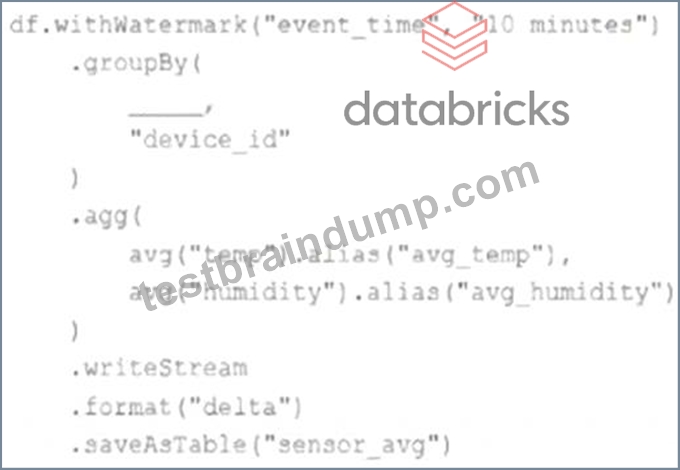
Choose the response that correctly fills in the blank within the code block to complete this task.
- A. window("event_time", "5 minutes").alias("time")
- B. to_interval("event_time", "5 minutes").alias("time")
- C. "event_time"
- D. lag("event_time", "10 minutes").alias("time")
- E. window("event_time", "10 minutes").alias("time")
Answer: A
Explanation:
This is the correct answer because the window function is used to group streaming data by time intervals. The window function takes two arguments: a time column and a window duration. The window duration specifies how long each window is, and must be a multiple of 1 second. In this case, the window duration is "5 minutes", which means each window will cover a non-overlapping five-minute interval. The window function also returns a struct column with two fields: start and end, which represent the start and end time of each window. The alias function is used to rename the struct column as "time". Verified References: [Databricks Certified Data Engineer Professional], under "Structured Streaming" section; Databricks Documentation, under "WINDOW" section.https://www.databricks.com/blog/2017/05/08/event-time-aggregation-watermarking-apache-sparks-struc
NEW QUESTION # 62
An upstream system is emitting change data capture (CDC) logs that are being written to a cloud object storage directory. Each record in the log indicates the change type (insert, update, or delete) and the values for each field after the change. The source table has a primary key identified by the fieldpk_id.
For auditing purposes, the data governance team wishes to maintain a full record of all values that have ever been valid in the source system. For analytical purposes, only the most recent value for each record needs to be recorded. The Databricks job to ingest these records occurs once per hour, but each individual record may have changed multiple times over the course of an hour.
Which solution meets these requirements?
- A. Use merge into to insert, update, or delete the most recent entry for each pk_id into a bronze table, then propagate all changes throughout the system.
- B. Iterate through an ordered set of changes to the table, applying each in turn; rely on Delta Lake's versioning ability to create an audit log.
- C. Create a separate history table for each pk_id resolve the current state of the table by running a union all filtering the history tables for the most recent state.
- D. Ingest all log information into a bronze table; use merge into to insert, update, or delete the most recent entry for each pk_id into a silver table to recreate the current table state.
- E. Use Delta Lake's change data feed to automatically process CDC data from an external system, propagating all changes to all dependent tables in the Lakehouse.
Answer: A
Explanation:
This is the correct answer because it meets the requirements of maintaining a full record of all values that have ever been valid in the source system and recreating the current table state with only the most recent value for each record. The code ingests all log information into a bronze table, which preserves the raw CDC data as it is. Then, it uses merge into to perform an upsert operation on a silver table, which means it will insert new records or update or delete existing records based on the change type and the pk_id columns. This way, the silver table will always reflect the current state of the source table, while the bronze table will keep the history of all changes. Verified References: [Databricks Certified Data Engineer Professional], under "Delta Lake" section; Databricks Documentation, under "Upsert into a table using merge" section.
NEW QUESTION # 63
An upstream system is emitting change data capture (CDC) logs that are being written to a cloud object storage directory. Each record in the log indicates the change type (insert, update, or delete) and the values for each field after the change. The source table has a primary key identified by the field pk_id.
For auditing purposes, the data governance team wishes to maintain a full record of all values that have ever been valid in the source system. For analytical purposes, only the most recent value for each record needs to be recorded. The Databricks job to ingest these records occurs once per hour, but each individual record may have changed multiple times over the course of an hour.
Which solution meets these requirements?
- A. Iterate through an ordered set of changes to the table, applying each in turn; rely on Delta Lake's versioning ability to create an audit log.
- B. Create a separate history table for each pk_id resolve the current state of the table by running a union all filtering the history tables for the most recent state.
- C. Ingest all log information into a bronze table; use merge into to insert, update, or delete the most recent entry for each pk_id into a silver table to recreate the current table state.
- D. Use Delta Lake's change data feed to automatically process CDC data from an external system, propagating all changes to all dependent tables in the Lakehouse.
- E. Use merge into to insert, update, or delete the most recent entry for each pk_id into a bronze table, then propagate all changes throughout the system.
Answer: C
Explanation:
This is the correct answer because it meets the requirements of maintaining a full record of all values that have ever been valid in the source system and recreating the current table state with only the most recent value for each record. The code ingests all log information into a bronze table, which preserves the raw CDC data as it is. Then, it uses merge into to perform an upsert operation on a silver table, which means it will insert new records or update or delete existing records based on the change type and the pk_id columns. This way, the silver table will always reflect the current state of the source table, while the bronze table will keep the history of all changes. Verified Reference: [Databricks Certified Data Engineer Professional], under "Delta Lake" section; Databricks Documentation, under "Upsert into a table using merge" section.
NEW QUESTION # 64
Each configuration below is identical to the extent that each cluster has 400 GB total of RAM, 160 total cores and only one Executor per VM.
Given a job with at least one wide transformation, which of the following cluster configurations will result in maximum performance?
- A. * Total VMs:2
* 200 GB per Executor
* 80 Cores / Executor - B. * Total VMs: 4
* 100 GB per Executor
* 40 Cores/Executor - C. * Total VMs: 8
* 50 GB per Executor
* 20 Cores / Executor - D. * Total VMs; 1
* 400 GB per Executor
* 160 Cores / Executor
Answer: C
Explanation:
This is the correct answer because it is the cluster configuration that will result in maximum performance for a job with at least one wide transformation. A wide transformation is a type of transformation that requires shuffling data across partitions, such as join, groupBy, or orderBy. Shuffling can be expensive and time- consuming, especially if there are too many or too few partitions. Therefore, it is important to choose a cluster configuration that can balance thetrade-off between parallelism and network overhead. In this case, having 8 VMs with 50 GB per executor and 20 cores per executor will create 8 partitions, each with enough memory and CPU resources to handle the shuffling efficiently. Having fewer VMs with more memory and cores per executor will create fewer partitions, which will reduce parallelism and increase the size of each shuffle block.
Having more VMs with less memory and cores per executor will create more partitions, which will increase parallelism but also increase the network overhead and the number of shuffle files. Verified References:
[Databricks Certified Data Engineer Professional], under "Performance Tuning" section; Databricks Documentation, under "Cluster configurations" section.
NEW QUESTION # 65
Which of the following describes how Databricks Repos can help facilitate CI/CD workflows on the
Databricks Lakehouse Platform?
- A. Databricks Repos can merge changes from a secondary Git branch into a main Git branch
- B. Databricks Repos can facilitate the pull request, review, and approval process before merging branches
- C. Databricks Repos can be used to design, develop, and trigger Git automation pipelines
- D. Databricks Repos can commit or push code changes to trigger a CI/CD process
- E. Databricks Repos can store the single-source-of-truth Git repository
Answer: D
NEW QUESTION # 66
The DevOps team has configured a production workload as a collection of notebooks scheduled to run daily using the Jobs UI. A new data engineering hire is onboarding to the team and has requested access to one of these notebooks to review the production logic.
What are the maximum notebook permissions that can be granted to the user without allowing accidental changes to production code or data?
- A. Can Read
- B. Can Manage
- C. No permissions
- D. Can Run
- E. Can Edit
Answer: C
Explanation:
This is the correct answer because it is the maximum notebook permissions that can be granted to the user without allowing accidental changes to production code or data. Notebook permissions are used to control access to notebooks in Databricks workspaces. There are four types of notebook permissions: Can Manage, Can Edit, Can Run, and Can Read. Can Manage allows full control over the notebook, including editing, running, deleting, exporting, and changing permissions. Can Edit allows modifying and running the notebook, but not changing permissions or deleting it. Can Run allows executing commands in an existing cluster attached to the notebook, but not modifying or exporting it. Can Read allows viewing the notebook content, but not running or modifying it. In this case, granting Can Read permission to the user will allow them to review the production logic in the notebook without allowing them to make any changes to it or run any commands that may affect production data. Verified References: [Databricks Certified Data Engineer Professional], under "Databricks Workspace" section; Databricks Documentation, under "Notebook permissions" section.
NEW QUESTION # 67
The data governance team has instituted a requirement that all tables containing Personal Identifiable Information (PH) must be clearly annotated. This includes adding column comments, table comments, and setting the custom table property "contains_pii" = true.
The following SQL DDL statement is executed to create a new table:
Which command allows manual confirmation that these three requirements have been met?
- A. DESCRIBE HISTORY dev.pii test
- B. DESCRIBE EXTENDED dev.pii test
- C. SHOW TBLPROPERTIES dev.pii test
- D. SHOW TABLES dev
- E. DESCRIBE DETAIL dev.pii test
Answer: B
Explanation:
This is the correct answer because it allows manual confirmation that these three requirements have been met.
The requirements are that all tables containing Personal Identifiable Information (PII) must be clearly annotated, which includes adding column comments, table comments, and setting the custom table property
"contains_pii" = true. The DESCRIBE EXTENDED command is used to display detailed information about a table, such as its schema, location, properties, and comments. By using this command on the dev.pii_test table, one can verify that the table has been created with the correct column comments, table comment, and custom table property as specified in the SQL DDL statement. Verified References: [Databricks Certified Data Engineer Professional], under "Lakehouse" section; Databricks Documentation, under "DESCRIBE EXTENDED" section.
NEW QUESTION # 68
The view updates represents an incremental batch of all newly ingested data to be inserted or updated in the customers table.
The following logic is used to process these records.
Which statement describes this implementation?
- A. The customers table is implemented as a Type 1 table; old values are overwritten by new values and no history is maintained.
- B. The customers table is implemented as a Type 0 table; all writes are append only with no changes to existing values.
- C. The customers table is implemented as a Type 2 table; old values are overwritten and new customers are appended.
- D. The customers table is implemented as a Type 2 table; old values are maintained but marked as no longer current and new values are inserted.
- E. The customers table is implemented as a Type 3 table; old values are maintained as a new column alongside the current value.
Answer: E
Explanation:
The logic uses the MERGE INTO command to merge new records from the view updates into the table customers. The MERGE INTO command takes two arguments: a target table and a source table or view. The command also specifies a condition to match records between the target and the source, and a set of actions to perform when there is a match or not. In this case, the condition is to match records by customer_id, which is the primary key of the customers table. The actions are to update the existing record in the target with the new values from the source, and set the current_flag to false to indicate that the record is no longer current; and to insert a new record in the target with the new values from the source, and set the current_flag to true to indicate that the record is current. This means that old values are maintained but marked as no longer current and new values are inserted, which is the definition of a Type 2 table. Verified References: [Databricks Certified Data Engineer Professional], under "Delta Lake" section; Databricks Documentation, under "Merge Into (Delta Lake on Databricks)" section.
NEW QUESTION # 69
A data engineering manager has noticed that each of the queries in a Databricks SQL dashboard takes a few
minutes to update when they manually click the "Refresh" button. They are curious why this might be
occurring, so a team member provides a variety of reasons on why the delay might be occurring.
Which of the following reasons fails to explain why the dashboard might be taking a few minutes to update?
- A. The queries attached to the dashboard might all be connected to their own, unstarted Databricks clusters
- B. The Job associated with updating the dashboard might be using a non-pooled endpoint
- C. The queries attached to the dashboard might take a few minutes to run under normal circumstances
- D. The SQL endpoint being used by each of the queries might need a few minutes to start up
- E. The queries attached to the dashboard might first be checking to determine if new data is available
Answer: B
NEW QUESTION # 70
Which of the following tool provides Data Access control, Access Audit, Data Lineage, and Data discovery?
- A. DELTA lake
- B. DELTA LIVE Pipelines
- C. Unity Catalog
- D. Data Governance
- E. Lakehouse
Answer: C
NEW QUESTION # 71
A Delta table of weather records is partitioned by date and has the below schema:
date DATE, device_id INT, temp FLOAT, latitude FLOAT, longitude FLOAT
To find all the records from within the Arctic Circle, you execute a query with the below filter:
latitude > 66.3
Which statement describes how the Delta engine identifies which files to load?
- A. All records are cached to attached storage and then the filter is applied
- B. The Delta log is scanned for min and max statistics for the latitude column
- C. All records are cached to an operational database and then the filter is applied
- D. The Hive metastore is scanned for min and max statistics for the latitude column
- E. The Parquet file footers are scanned for min and max statistics for the latitude column
Answer: B
Explanation:
This is the correct answer because Delta Lake uses a transaction log to store metadata about each table, including min and max statistics for each column in each data file. The Delta engine can use this information to quickly identify which files to load based on a filter condition, without scanning the entire table or the file footers. This is called data skipping and it can improve query performance significantly. Verified Reference: [Databricks Certified Data Engineer Professional], under "Delta Lake" section; [Databricks Documentation], under "Optimizations - Data Skipping" section.
In the Transaction log, Delta Lake captures statistics for each data file of the table. These statistics indicate per file:
- Total number of records
- Minimum value in each column of the first 32 columns of the table
- Maximum value in each column of the first 32 columns of the table
- Null value counts for in each column of the first 32 columns of the table When a query with a selective filter is executed against the table, the query optimizer uses these statistics to generate the query result. it leverages them to identify data files that may contain records matching the conditional filter.
For the SELECT query in the question, The transaction log is scanned for min and max statistics for the price column
NEW QUESTION # 72
You are currently asked to work on building a data pipeline, you have noticed that you are currently working on a very large scale ETL many data dependencies, which of the following tools can be used to address this problem?
- A. JOBS and TASKS
- B. AUTO LOADER
- C. SQL Endpoints
- D. DELTA LIVE TABLES
- E. STRUCTURED STREAMING with MULTI HOP
Answer: D
Explanation:
Explanation
The answer is, DELTA LIVE TABLES
DLT simplifies data dependencies by building DAG-based joins between live tables. Here is a view of how the dag looks with data dependencies without additional meta data,
1.create or replace live view customers
2.select * from customers;
3.
4.create or replace live view sales_orders_raw
5.select * from sales_orders;
6.
7.create or replace live view sales_orders_cleaned
8.as
9.select sales.* from
10.live.sales_orders_raw s
11. join live.customers c
12.on c.customer_id = s.customer_id
13.where c.city = 'LA';
14.
15.create or replace live table sales_orders_in_la
16.selects from sales_orders_cleaned;
Above code creates below dag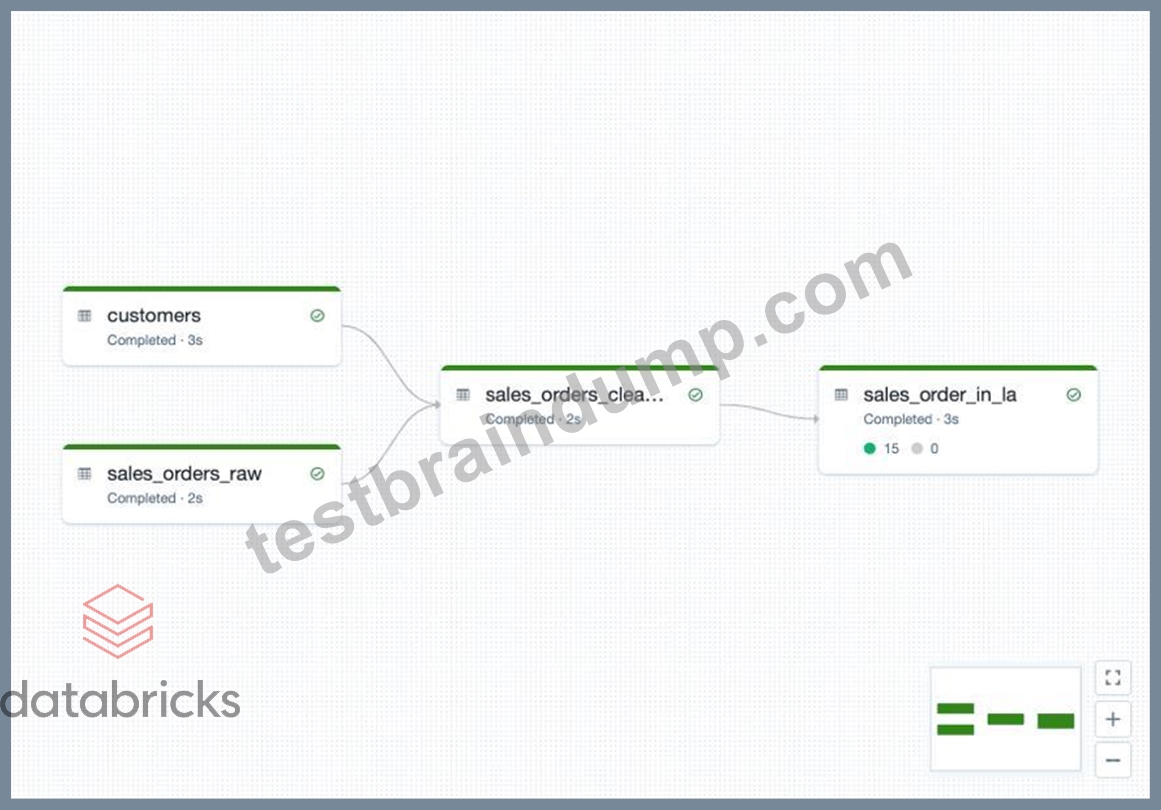
Documentation on DELTA LIVE TABLES,
https://databricks.com/product/delta-live-tables
https://databricks.com/blog/2022/04/05/announcing-generally-availability-of-databricks-delta-live-tables-dlt.htm DELTA LIVE TABLES, addresses below challenges when building ETL processes
1.Complexities of large scale ETL
a.Hard to build and maintain dependencies
b.Difficult to switch between batch and stream
2.Data quality and governance
a.Difficult to monitor and enforce data quality
b.Impossible to trace data lineage
3.Difficult pipeline operations
a.Poor observability at granular data level
b.Error handling and recovery is laborious
NEW QUESTION # 73
......
Databricks-Certified-Professional-Data-Engineer Dumps and Practice Test (204 Exam Questions): https://www.testbraindump.com/Databricks-Certified-Professional-Data-Engineer-exam-prep.html
